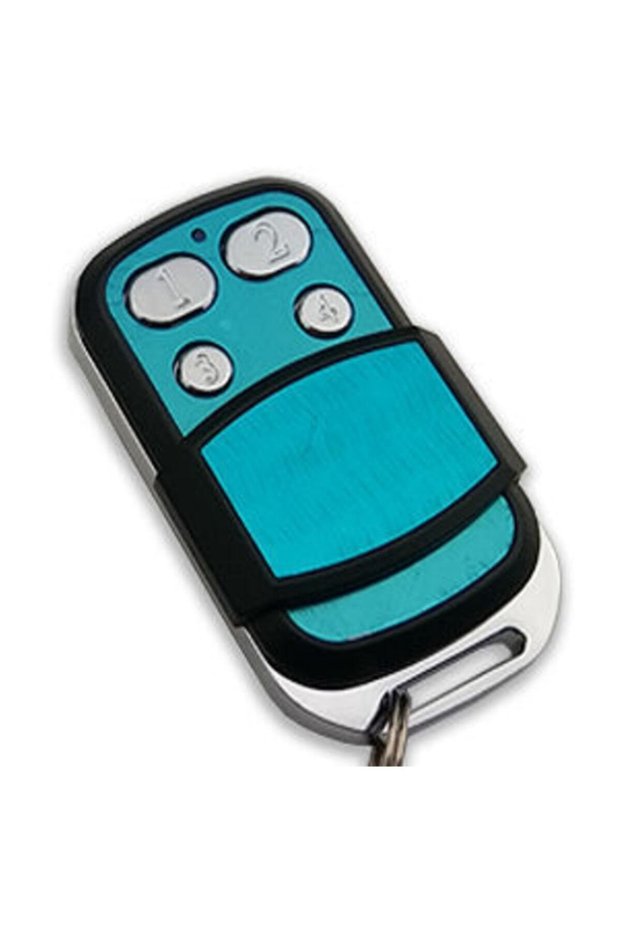
Generic Brand Smart Learnable Shutter Garage Door Control 433 Mhz

Lowest price in 7 days

-64%

14.85
AED
41.25

(incl. VAT)

Delivery address
Free shipping
Estimated delivery: 23 - 26 October
Select your address, find out the delivery date!
International delivery

Trendyol's commitments

Easy and free return in 15 days.

Payment methods

Split your purchase in up to 6 payments

Split your purchase in up to 12 payments

Pay with cash or card upon delivery, or pay online now.

Highlighted features:

    Generic Brand Smart Learnable Shutter Garage Door Control 433 Mhz features

    Door Opening Direction
    Right
    Type
    Door
    Warranty Period
    No warranty
    Material
    Metal
    Origin
    UM
    2.8K followers

    Seller information

    GO TO STORE

    Other sellers

    Estimated delivery: 23 - 26 October

    Free shipping

    -64%

    14.71
    AED
    40.99

    Estimated delivery: 23 - 26 October

    Free shipping

    -65%

    15.90
    AED
    44.84

    Similar items

    product card placeholder

    Shoppers also viewed

    product card placeholder

    Generic Brand Smart Learnable Shutter Garage Door Control 433 Mhz reviews

    4.6
    181 ratings
    66 reviewsfotoğraflı yorum iconu
    **** ****13 September 2026
    Fit is very good, good quality
    F** C**04 January 2026
    You can get it useful and durable
    S** B**10 April 2025
    The product is nice but the packaging is 0. Respect for the effort, the remote controls are directly in the box They taped it with tape and sent it.
    S** A**13 October 2024
    We liked it, it was very nice
    **** ****04 January 2024
    It's a good quality, nice product. It did the job well enough for me.

    Product Q&As

    sir i have wicom uk01 with ABCD key, it does not reset or copy other remote can you help me

    Answer from OCk Otomasyon

    Hi Sir, Wicom UK-01 is for rolling remotes and UK 44 does not copy

    Translated by Google

    How is copying done? I looked a lot and couldn't find it. The product arrived and I couldn't copy it.

    Answer from OCk Otomasyon

    Can you write OCk Studio Wicom UK-44 Smart Encodable Shutter Remote Control in the YouTube search section?

    Translated by Google

    HOW TO COPY

    Answer from OCk Otomasyon

    Sir, we are sending you a QR code that you can directly access the YouTube video we shot, explaining how you can easily copy the product yourself. You can directly access the video by scanning this QR code with your phone and perform the copying process. For your information

    Translated by Google

    Hello, does the remote control come with a reset? Can we put the backup directly on the remote control and code it?

    Answer from OCk Otomasyon

    We send you the QR code of the YouTube video we shot together with the product. By scanning it on your phone, you can access that video directly and perform the operations there, which are very short operations and you can easily copy them.

    Translated by Google

    good day easy come, after coding the remote control, can we reset it again and code it again to another remote control.

    Answer from OCk Otomasyon

    Yes sir, but there is no need for this, because you can copy 4 different remotes to 4 buttons (of course, if the remotes to be copied are copyable remotes). Have a good day

    Translated by Google

    product-card-placeholder

    Product details

    Product description

    Wicom encodable garage door barrier remote wicom 4 button 433 mhz garage remote features compatible modelswicom 4 button 433 mhz garage remote

    brands it cannot copy exactly: elero / nice / rolan / bft you can encode your old remote in a few seconds with easy coding.

    press and hold the button you want to encode on the new remote you want to make,

    the light will flash twice after the light flashes,

    press and hold the button on the old remote of the remote you want to encode, the light will turn on directly and the coding is complete.

    remote reset process press buttons 1 and 2 at the same time the light will flash 3 times,

    then press button 2 3 times and release, the reset process is complete when the light stays on.

    l50

    Additional info

    • The selling price on Trendyol already includes the export-related costs.
    • Sold by .
    • A maximum of 5 units of this product can be ordered. Trendyol reserves the right to cancel orders over 5 units.
    • Barcode No: 1010520
    • Origin: UM

    Generic Brand Smart Learnable Shutter Garage Door Control 433 Mhz features

    Door Opening Direction
    Right
    Type
    Door
    Warranty Period
    No warranty
    Material
    Metal
    Origin
    UM

    Safety information

    Product safety information

    Product description

    4-button smart, learnable,       Copyable       Garage, shutter, barrier and car park controller     


    Please read all description below before buy the item!!!


    Brands that cannot be copied for sure:   elero / nice / rolan / bft


    If your original remote control is one of these 3 brands, our product will definitely not be able to copy your original remote control...


    Simple copy operation:


    The most important trick here is to keep holding the button on the wicom remote that we want to copy from the beginning until the end of the copying process.


    There are 2 methods as copy method.


    First, try method 1 (you can watch the video of method 1 above). if method 1 fails, try method 2.


    1st method:


    Step 1: place the new remote control on top and the old remote control on the bottom, so that both remotes are...         Back to back      Give


    Step 2: press and hold button a on the new remote control (the red light will remain on continuously). press button b three times in quick succession. as you begin pressing, the light will completely turn off. at the end of the 5th press, the light will flash as a signal and then completely turn off.


    New remote controlWe still not stop pressing the a key


    Step 3: while continuing to hold the "a" button, simultaneously press and hold the button on your old remote that you frequently use. the light will illuminate again. continue holding both buttons for a few more seconds (2-3 seconds) until the light flashes three times, signaling completion.


    After receiving the signal, we completely remove our fingers from the keys we were holding down, and the process is complete. this way, we have identified the button of your old remote that you used before to the 'a' key of the new remote.


    Now you can easily open and close the door/barrier with the a button on your new remote control.


    Note: if you want to assign a function to the "b" button on your new remote control, as well as another button, you'll repeat the same process, this time holding the "b" button down continuously from start to finish.


    We press and hold b, press and release a three times, then with the second button of the old remote, we press and hold b to define the second button this time.