Free shipping
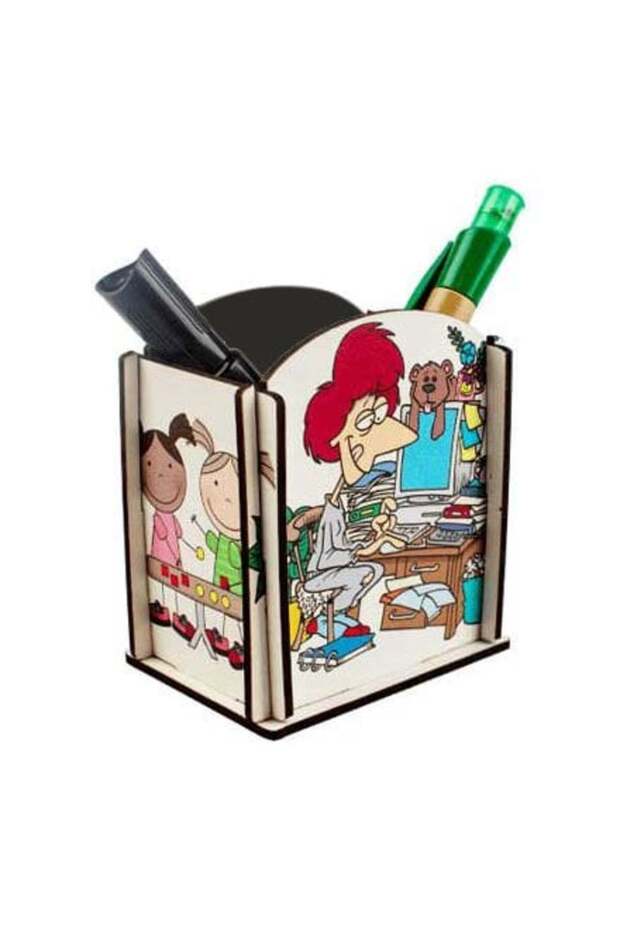


STAR FILM Sublimation-Printed Eco-Friendly MDF Wooden Pencil Holder
No reviews yet.
-61%
19.43
AED
49.82
(incl. VAT)
Free shipping
Delivery address

Select your address, find out the delivery date!
International deliveryMore products to discover
Trendyol's commitments
Easy and free return in 15 days.
Payment methods




Coupons
Highlighted features:
STAR FILM Sublimation-Printed Eco-Friendly MDF Wooden Pencil Holder features
Material
Fabric
Origin
TR
Color
Multicolor

Bitmeyen Kartuş

9.5
124.0K followers
Seller information
STAR FILM Sublimation-Printed Eco-Friendly MDF Wooden Pencil Holder reviews
No reviews yet.
Product details
Additional info
- Made in Türkiye
- A maximum of 5 units of this product can be ordered. Trendyol reserves the right to cancel orders over 5 units.
- Sold by .
- The selling price on Trendyol already includes the export-related costs.
- Barcode No: sf_SDA-011
- Origin: TR
STAR FILM Sublimation-Printed Eco-Friendly MDF Wooden Pencil Holder features
Material
Fabric
Origin
TR
Color
Multicolor
Safety information
Product safety information
Product description
Sublimation-Printed Affordable MDF Wooden Pencil Holder
Suitable for sublimation and laser transfer printing.
The product arrives unassembled. It can be easily assembled after printing.
The product consists of 5 pieces of MDF, one side of which is white.
Product dimensions: 9 x 6.5 x 9.5 cm
To print on mdf products using a sublimation printer and sublimation transfer paper, you can follow these steps:
Necessary materials:
Sublimation printer (compatible with sublimation ink)
Sublimation Transfer Paper
Mdf printed products (coasters, magnets, clocks, keychains, etc.)
Heat press machine
Print design (prepared in a digital format)
Heat resistant tape
Protective paper or fire-resistant teflon fabric
Create the design.
Prepare the design you want to print in a graphics design program (photoshop, coreldraw, etc.).
Before printing the design, flip it over (get a mirror image), especially if there is text, as this step is important.
Adjust the design size according to the dimensions of the hdf product.
Sublimation printer settings:
Select “high quality” as the print type and “matte” as the paper type.
Print the prepared design onto sublimation transfer paper.
Place the transfer paper on the mdf product so that it makes contact with the printing surface.
Secure the paper with heat-resistant tape to prevent it from moving.
To prevent the heat-resistant tape from leaving a mark, apply it to the back of the mdf, not to the surface that will be printed on.
Place the mdf product in your flat transfer press with the transfer paper on the bottom and the design on top.
Temperature and time settings:
Temperature: 170-180 °c, time: 60-90 seconds, pressure: medium pressure.
This duration may vary depending on the type of press, paper, and ink you use.
We recommend that you conduct tests for printing with different equipment and materials.
To prevent the heat press from causing damage, place a protective sheet of paper (if available, use non-flammable teflon fabric) on top of the transfer paper.
Use a heat press:Apply the pressure for the duration and at the temperature you have set.
After turning on the heat press, carefully remove the mdf and check it by peeling the paper off the surface immediately.
Make sure the print is perfectly aligned on the surface and that the colors are vibrant.
Tips:
Test print: if you are doing this for the first time, start by making a test print to ensure that the settings are correct.
Note: the product is sold without printing and at a wholesale price.