Men

Boxer ShortsMen BriefsSuits

Home

Bosch Upright Vacuum CleanersFanDehumidifierFabric SoftenersMicrowave OvenPhilips Upright Vacuum CleanersMopsBedding SetMultipurpose CookerRowenta Upright Vacuum CleanersRefrigeratorPillowsRobot Vacuum CleanerSandwich MakersVileda MopsWashing MachineXiaomi Robot Vacuum CleanerUpright Vacuum CleanersVacuum CleanerLeifheit MopsMixerRoborock Robot Vacuum Cleaner

Kids

Barbie PuppetsKids’ BikesKids SneakersLANSINOH Baby BottlesKids Stroller & PushchairKids Car SeatKids SweatsuitsBaby & Toddler ToysKids ShoesKids SandalsKids BootsPuppetsPhilips Avent Baby BottlesBaby BottlesToys

Women

Kids Polo T-ShirtsKids Watchesadidas TrousersKids SunglassesKids PajamasPandora JewelryBrasNike SocksJewelryNecklacesBlousesRingsJeansPajamasNike SweatpantsDressesBlack DressesKids EarringsNike T-ShirtsCharmsMANGO DressesShortsPolo T-ShirtsSunglassesBlack JeansSwarovski JewelrySwarovski EarringsEarringsSweatpantsSwimsuitsSweatshirtsT-ShirtsPink DressesSkirtsTriumph BrasSocksWatchesTrousersSwimsuitsWhite DressesWhite JeansWhite TrousersWhite T-ShirtsBikiniPandora EarringsPandora RingsPandora Charms

Beauty

Blue NailAvon Fragrances and DeodorantsEyelinersLip GlossesLashesNailCollagenLattafa Fragrances and DeodorantsLipsticksMascarasBeautyMakeupShampoosFragrances and DeodorantsBraun EpilatorEpilatorPhilips Epilator

Home Decor

Blue CarpetBedGray CarpetGreen CarpetChairsGray WallpaperIKEA DrapesCouchBeige CarpetBathroom FurnitureParquetPink CarpetNightstandsOffice DeskFurnitureDrapesDresserLightingPaintPaintingsChandelierRugTablesToilet SeatsWallpaperWhite CarpetWhite NightstandsWhite Wallpaper

Electronics

Apple SmartwatchesHuawei LaptopsJBL SpeakersDell LaptopsHP LaptopsLENOVO LaptopsApple LaptopsHeadphonesJBL HeadphonesHonor TelephoneMotorola TelephoneHuawei SmartwatchesSoundbarsSamsung SmartwatchesLaptopsSpeakersSamsung TelephoneSSD HarddisksSmartwatchesTabletsTelephoneXiaomi SmartwatchesXiaomi TelephoneMousePlaystation 5RouterSamsung SoundbarsTelevision

Supermarket

Barilla PastaChipsCerealsLays ChipsJacobs CoffeePastaLavAzza CoffeePistachioDavidoff CoffeeCoffeeTchibo CoffeeBulgurFortuna CoffeeConfectioneryWaterTurmeric

Shoes & Bags

Geox BootsBallerina FlatsEspadrillesLoafer ShoesBeige ShoesBootsGold-colored SandalsNike CramponsLuggageBootsBackpacksBum BagsBlack Ballerina FlatsCramponsadidas BootsBlack ShoesCasual ShoesPuma BootsCrocs AccessorySkechers SandalsSandalsShoesBeige SandalsStilettosBrown ShoesGold-colored ShoesGuess SandalsBagsTimberland BootsSandalsTommy Hilfiger SandalsWalletsWhite BootsSports ShoesUGG BootsWhite Ballerina FlatsWhite ShoesWhite Sandalsadidas SneakersSneakers

Popular Brands

ALEXANDER MCQUEENCifASOSCarrefourDecathlonDeeZeeBIOMECANICSDoTERRACoccinelleDesigualCybexcharlotte tilburyBABY BREZZAColmarBALMAINChristian DiorBalenciagaDoritosDewaltDr MartensBekoAriana GrandeAptamilElectroluxDoppelherzCartierDelonghiAntonio BanderasBuffaloBonprixAmiriAldoChanelEccoBirkenstockAppleAmdDieselBioSilAlfaparfFortunaBritney SpearsBabylissAvonBarbieBigottiBatmanCarolina HerreraDYSONASUSCrocsAlwaysBiodermaArielBepanthenDiorDellFURLADurexDunhillEmporio ArmaniGantEssenceDavid BeckhamAveneElseveBurberryDeichmannGarminGrintussGoProFarmasiFENTY BEAUTYCeraVeGAPColumbiaGolden GooseCroppCasioDJICalvin KleinGiorgio ArmaniadidasBershkaCarharttHermesHarry PotterHikvisionGucciGeoxHello KittyhokaEnglish HomeCOSGNCISABEL MARANTHonorHuggiesHuaweiHuda BeautyGivenchyHerbalifeHugoHugo BossHusqvarnaKifraGuessK18JBLHOT WHEELSKinderJumboKarcherJean Paul GaultierKarl LagerfeldIKEAKerastaseKIKOBoschL'OccitaneJuicy CoutureAsicsLaneigeLanvinLacosteJORDANLaysLancomeLinexJimmy ChooLa Roche PosayLattafaMaison MargielaLENOVOMakitaLC WaikikiLavAzzalogitechConverseEstee LauderLEGOMichelinMieleMedicubeMilwaukeeMichael KorsMomaxMonclerMilkshakeMinisoMANGOMontaleMoroccanoilMotorolaMYPROTEINMilkaMoon BootMylineMonopolyMayoralNextNespressoNokiaNutellaNutribulletNikeNintendoOppoOneplusNew BalanceMacOsteocareONLYOriflameOlaplexPalm AngelsPaco RabannePandoraPARKSIDEPaniniPampersPeppa PigPringlesRedoxonRalph LaurenRAZERRemaxPhilipsRed BullPrimarkRitualsPHILIPP PLEINRoborockPolaroidPumaRevoxSanoSanteSchweppesRoyal CaninSamsonitePradaSalomonSinsaySamsungSkullcandySeikoSol de JaneiroSkechersPentiSonicSephoraSPONGEBOBSHEINSpidermanSteve MaddenSupradynSTIHLStarbucksTakisTamagotchiStanleySwarovskiStone IslandTCLSudocremTESLATissotStradivariusTEFALTchiboTimberlandThe North FaceThe OrdinaryVera WangUGGVagabondTommy HilfigerValentinoUnder ArmourTriumphTom TailorTom FordVichyvivoVersaceVansXerjoffZzzquilVogueXiaomiYves Saint LaurentVivienne WestwoodYves Rocher

Sports & Outdoor

BicycleElectric BikeFootball JerseysElectric ScooterBasketball ProductsPoolFootballTennisTentHoverboardPilatesSkateboard

Books & Stationery

BookmarkChildren's StorybooksColored PencilsAgendaColoring BooksFolderBooksBallpoint PensPencil CasesNovelNotebooksMangaPuzzle
category-top-ranking-icon

#1 Bestseller in Converters & Adapters

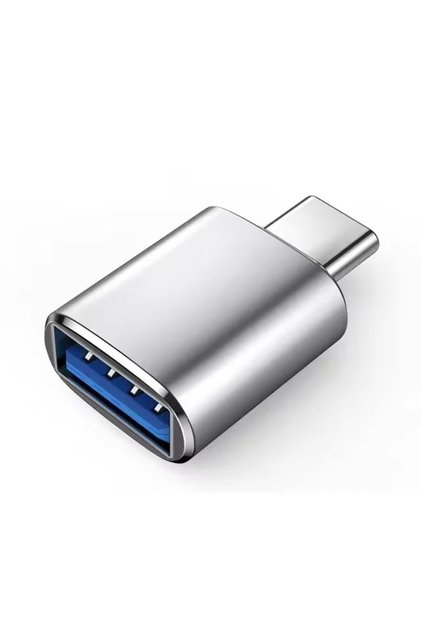
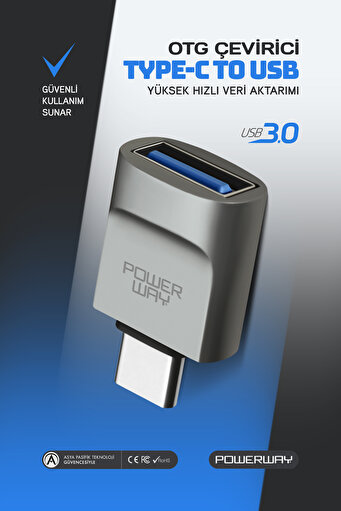
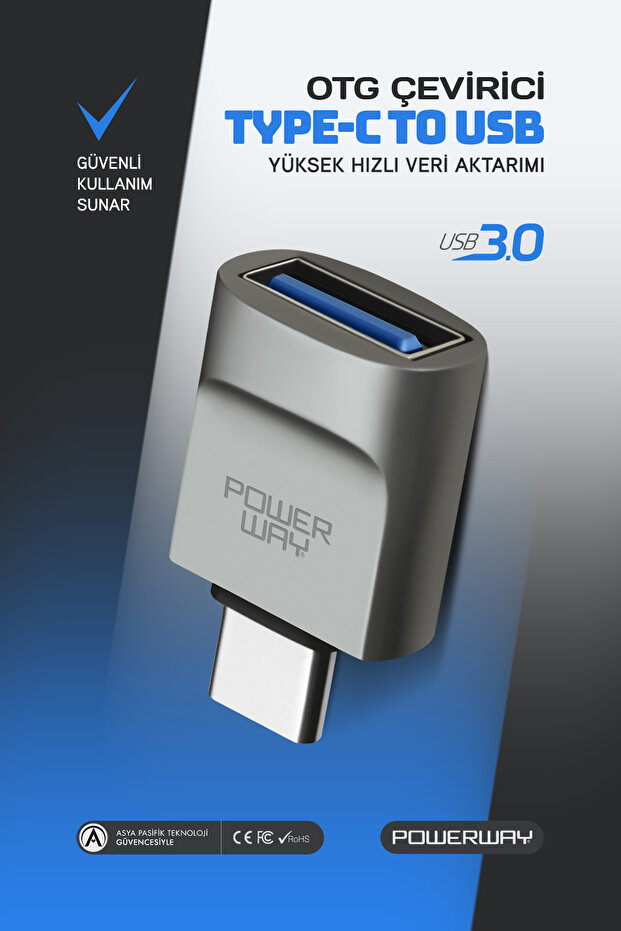
Powerway Type-C to Usb 3.0 (HIGH SPEED) Data Transfer Otg Converter Adapter

TY Plus icon Trendyol Plus Exclusive
At checkout 15.28 AED
15.39 AED32.74 AED
Free shipping
Delivery address
Estimated delivery: 5 - 9 December
Select your address, find out the delivery date!
International delivery

Trendyol's commitments

Easy and free return in 15 days.

Payment methods

Get up to 30% extra off! Use code: FAB

Split into up to 6 payments. 0% fees on 6 payments over 400 AED.

Split your purchase in up to 12 payments

Pay with cash or card upon delivery, or pay online now.

Highlighted features:

POWERWAY Type-C to Usb 3.0 (HIGH SPEED) Data Transfer Otg Converter Adapter features

Color
Turquoise
Origin
CN
Asya Pasifik Teknoloji
10
381.0K followers

Seller information

Seller information
GO TO STORE

Similar items

product card placeholder

Shoppers also viewed

product card placeholder

POWERWAY Type-C to Usb 3.0 (HIGH SPEED) Data Transfer Otg Converter Adapter reviews

4.5
4179 ratings
1451 reviewsfotoğraflı yorum iconu
Z** K**18 August 2026
Very useful
Z** Ç**03 November 2026
beautiful and high-quality
A** A**21 November 2026
This is the quality
B** A** Y**28 September 2026
good good quality
S** N** A**08 November 2026
Very useful

SHOW ALL REVIEWS

Product Q&As

Hello. What is its capacity?

Answer from Asya Pasifik Teknoloji

Hello, our product functions as a converter and is not a product with a capacity feature.

Translated by Google

Hello, is it possible to set up an internet connection?

Answer from Asya Pasifik Teknoloji

Hello, you can easily use your Android type-C OTG devices on all your compatible devices. These devices are ideal for operations such as connecting a keyboard, mouse to your phone or exchanging data with a USB flash drive. You can use it on any devices with Type-C (USB-C) input. You can check your user manual or search on the internet to know if your device has Type-C input. Nowadays, the charging ports of new generation mobile phones and some models of Macbook and iPad contain Type-C ports. Additionally, with the Type-C OTG adapter, you can convert your Type-C input to USB and connect devices such as keyboard, mouse, USB memory, game controller to your device. If you want to connect larger devices, such as a printer or an external hard drive, we recommend that you find out whether the two devices are compatible with each other in the user manual or on the internet. Thank you and have a nice day.
Translated by Google

is it suitable for gaming

Answer from Asya Pasifik Teknoloji

Hi, it can use as a dialer.

Translated by Google

Is the input type-c output USB?

Answer from Asya Pasifik Teknoloji

Hello, yes it is true, it is suitable for devices with type-c input.

Translated by Google

Hello, is it possible to transfer images from a phone with type C port to a flash drive?

Answer from Asya Pasifik Teknoloji

Hello, it is compatible sir.

Translated by Google

Hello, you bought it for my quad, can it be used with a girdle?

Answer from Asya Pasifik Teknoloji

Hello. Compatible with all devices with type-c input, sir. Thank you and have a good day.

Translated by Google

can i turn the type c adapter to usb a and charge a phone

Answer from Asya Pasifik Teknoloji

Hello, you can easily use your Android type-C OTG devices on all your compatible devices. These devices are ideal for operations such as connecting a keyboard, mouse to your phone or exchanging data with a USB flash drive. You can use it on any devices with Type-C (USB-C) input. You can check your user manual or search on the internet to know if your device has Type-C input. Nowadays, the charging ports of new generation mobile phones and some models of Macbook and iPad contain Type-C ports. Additionally, with the Type-C OTG adapter, you can convert your Type-C input to USB and connect devices such as keyboard, mouse, USB memory, game controller to your device. If you want to connect larger devices, such as a printer or an external hard drive, we recommend that you find out whether the two devices are compatible with each other in the user manual or on the internet. Thank you and have a nice day.

Translated by Google

Hello, I am a student and I want to prepare my presentations from iPad Canva, transfer them to type-c and open them on the smart board. Is it okay? And is it necessary to plug in a normal USB behind it after burning the type-c?

Answer from Asya Pasifik Teknoloji

Hello, you can easily use your type-C OTG devices on all your compatible devices. These devices are ideal for operations such as connecting a keyboard, mouse to your phone or exchanging data with a USB flash drive. You can use it on any devices with Type-C (USB-C) input. You can check your user manual or search on the internet to know if your device has Type-C input. Nowadays, the charging ports of new generation mobile phones and some models of Macbook and iPad have Type-C ports. Additionally, with the Type-C OTG adapter, you can convert your Type-C input to USB and connect devices such as keyboard, mouse, USB memory, game controller to your device. If you want to connect larger devices, such as a printer or an external hard drive, we recommend checking the user manual or researching online to see if the two devices are compatible. Thank you and have a nice day.

Translated by Google

Hello, do you need this product with a 1 or 1.5 meter cable?

Answer from Asya Pasifik Teknoloji

Hello unfortunately it is not available.

Translated by Google

Is this product micro wide tip?

Answer from Asya Pasifik Teknoloji

Hello, type-c input is suitable for devices and USB is plugged into the other side.

Translated by Google

Is it metal?

Answer from Asya Pasifik Teknoloji

Hello, our product is ABS plastic.

Translated by Google

Can music be downloaded from a phone and transferred to a flash drive?

Answer from Asya Pasifik Teknoloji

Hello. Compatible with all devices with type-c input, sir. Thank you and have a good day.

Translated by Google

does it do audio transfer?

Answer from Asya Pasifik Teknoloji

Hello, you can easily use your Android type-C OTG devices on all your compatible devices. These devices are ideal for operations such as connecting a keyboard, mouse to your phone or exchanging data with a USB flash drive. You can use it on any devices with Type-C (USB-C) input. You can check your user manual or search on the internet to know if your device has Type-C input. Nowadays, the charging ports of new generation mobile phones and some models of Macbook and iPad contain Type-C ports. Additionally, with the Type-C OTG adapter, you can convert your Type-C input to USB and connect devices such as keyboard, mouse, USB memory, game controller to your device. If you want to connect larger devices, such as a printer or an external hard drive, we recommend that you find out whether the two devices are compatible with each other in the user manual or on the internet. Thank you and have a nice day.

Translated by Google

how much is the capacity

Answer from Asya Pasifik Teknoloji

Hello, you can easily use your Android type-C OTG devices on all your compatible devices. These devices are ideal for operations such as connecting a keyboard, mouse to your phone or exchanging data with a USB flash drive. You can use it on any devices with Type-C (USB-C) input. You can check your user manual or search on the internet to know if your device has Type-C input. Nowadays, the charging ports of new generation mobile phones and some models of Macbook and iPad contain Type-C ports. Additionally, with the Type-C OTG adapter, you can convert your Type-C input to USB and connect devices such as keyboard, mouse, USB memory, game controller to your device. If you want to connect larger devices, such as a printer or an external hard drive, we recommend that you find out whether the two devices are compatible with each other in the user manual or on the internet. Thank you and have a nice day.

Translated by Google

Is the tip thick?

Answer from Asya Pasifik Teknoloji

Hello, it is type-c tip.

Translated by Google

I'm stuck with filas

Answer from Asya Pasifik Teknoloji

Hi, you can put a flash drive in.

Translated by Google

I want to plug it in to charge my phone, not to send anything. Are these suitable for my USB-C ports? I’m asking so I can charge my phone from my tablet during class.

Answer from Asya Pasifik Teknoloji

Hello, it's also suitable for charging, sir

Translated by Google

Can I transfer songs from my phone to a flash drive?

Answer from Asya Pasifik Teknoloji

Hello, you can easily use your Android type-C OTG devices on all your compatible devices. These devices are ideal for operations such as connecting a keyboard, mouse to your phone or exchanging data with a USB flash drive. You can use it on any devices with Type-C (USB-C) input. You can check your user manual or search on the internet to know if your device has Type-C input. Nowadays, the charging ports of new generation mobile phones and some models of Macbook and iPad contain Type-C ports. Additionally, with the Type-C OTG adapter, you can convert your Type-C input to USB and connect devices such as keyboard, mouse, USB memory, game controller to your device. If you want to connect larger devices, such as a printer or an external hard drive, we recommend that you find out whether the two devices are compatible with each other in the user manual or on the internet. Thank you and have a nice day.

Translated by Google

Hi, I'm going to buy one to connect the printer to the computer, right?

Answer from Asya Pasifik Teknoloji

Hello, you can easily use your Android type-C OTG devices on all your compatible devices. These devices are ideal for operations such as connecting a keyboard, mouse to your phone or exchanging data with a USB flash drive. You can use it on any devices with Type-C (USB-C) input. You can check your user manual or search on the internet to know if your device has Type-C input. Nowadays, the charging ports of new generation mobile phones and some models of Macbook and iPad contain Type-C ports. Additionally, with the Type-C OTG adapter, you can convert your Type-C input to USB and connect devices such as keyboard, mouse, USB memory, game controller to your device. If you want to connect larger devices, such as a printer or an external hard drive, we recommend that you find out whether the two devices are compatible with each other in the user manual or on the internet. Thank you and have a nice day.

Translated by Google

Hello, sir. Good afternoon. Is this a suitable way to transfer my presentation to a flash drive?

Answer from Asya Pasifik Teknoloji

Hello, you can easily use your Android type-C OTG devices on all your compatible devices. These devices are ideal for operations such as connecting a keyboard, mouse to your phone or exchanging data with a USB flash drive. You can use it on any devices with Type-C (USB-C) input. You can check your user manual or search on the internet to know if your device has Type-C input. Nowadays, the charging ports of new generation mobile phones and some models of Macbook and iPad contain Type-C ports. Additionally, with the Type-C OTG adapter, you can convert your Type-C input to USB and connect devices such as keyboard, mouse, USB memory, game controller to your device. If you want to connect larger devices, such as a printer or an external hard drive, we recommend that you find out whether the two devices are compatible with each other in the user manual or on the internet. Thank you and have a nice day.

Translated by Google

Does the product have storage capabilities even when it's just plugged into the phone?

Answer from Asya Pasifik Teknoloji

Hello, you can easily use your Android type-C OTG devices on all your compatible devices. These devices are ideal for operations such as connecting a keyboard, mouse to your phone or exchanging data with a USB flash drive. You can use it on any devices with Type-C (USB-C) input. You can check your user manual or search on the internet to know if your device has Type-C input. Nowadays, the charging ports of new generation mobile phones and some models of Macbook and iPad contain Type-C ports. Additionally, with the Type-C OTG adapter, you can convert your Type-C input to USB and connect devices such as keyboard, mouse, USB memory, game controller to your device. If you want to connect larger devices, such as a printer or an external hard drive, we recommend that you find out whether the two devices are compatible with each other in the user manual or on the internet. Thank you and have a nice day.

Translated by Google

Will it make a sound if we plug in USB headphones?

Answer from Asya Pasifik Teknoloji

Hello, you can easily use your Android type-C OTG devices on all your compatible devices. These devices are ideal for operations such as connecting a keyboard, mouse to your phone or exchanging data with a USB flash drive. You can use it on any devices with Type-C (USB-C) input. You can check your user manual or search on the internet to know if your device has Type-C input. Nowadays, the charging ports of new generation mobile phones and some models of Macbook and iPad contain Type-C ports. Additionally, with the Type-C OTG adapter, you can convert your Type-C input to USB and connect devices such as keyboard, mouse, USB memory, game controller to your device. If you want to connect larger devices, such as a printer or an external hard drive, we recommend that you find out whether the two devices are compatible with each other in the user manual or on the internet. Thank you and have a nice day.

Translated by Google

Can a flash drive be used in place of the car's internal memory to charge a mobile phone?

Answer from Asya Pasifik Teknoloji

Hello, you can easily use your Android type-C OTG devices on all your compatible devices. These devices are ideal for operations such as connecting a keyboard, mouse to your phone or exchanging data with a USB flash drive. You can use it on any devices with Type-C (USB-C) input. You can check your user manual or search on the internet to know if your device has Type-C input. Nowadays, the charging ports of new generation mobile phones and some models of Macbook and iPad contain Type-C ports. Additionally, with the Type-C OTG adapter, you can convert your Type-C input to USB and connect devices such as keyboard, mouse, USB memory, game controller to your device. If you want to connect larger devices, such as a printer or an external hard drive, we recommend that you find out whether the two devices are compatible with each other in the user manual or on the internet. Thank you and have a nice day.

Translated by Google

Hello, could we connect a flash drive to this device, then connect it to the phone, and load music onto the flash drive? Thank you.

Answer from Asya Pasifik Teknoloji

Hello, you can easily use your Android type-C OTG devices on all your compatible devices. These devices are ideal for operations such as connecting a keyboard, mouse to your phone or exchanging data with a USB flash drive. You can use it on any devices with Type-C (USB-C) input. You can check your user manual or search on the internet to know if your device has Type-C input. Nowadays, the charging ports of new generation mobile phones and some models of Macbook and iPad contain Type-C ports. Additionally, with the Type-C OTG adapter, you can convert your Type-C input to USB and connect devices such as keyboard, mouse, USB memory, game controller to your device. If you want to connect larger devices, such as a printer or an external hard drive, we recommend that you find out whether the two devices are compatible with each other in the user manual or on the internet. Thank you and have a nice day.

Translated by Google

Hi, can music be played on this?

Answer from Asya Pasifik Teknoloji

Hello, you can easily use your Android type-C OTG devices on all your compatible devices. These devices are ideal for operations such as connecting a keyboard, mouse to your phone or exchanging data with a USB flash drive. You can use it on any devices with Type-C (USB-C) input. You can check your user manual or search on the internet to know if your device has Type-C input. Nowadays, the charging ports of new generation mobile phones and some models of Macbook and iPad contain Type-C ports. Additionally, with the Type-C OTG adapter, you can convert your Type-C input to USB and connect devices such as keyboard, mouse, USB memory, game controller to your device. If you want to connect larger devices, such as a printer or an external hard drive, we recommend that you find out whether the two devices are compatible with each other in the user manual or on the internet. Thank you and have a nice day.

Translated by Google

hello i want to send pics to phone from flash drive and send pics from phone to flash drive will this device do

Answer from Asya Pasifik Teknoloji

Hello, you can easily use your Android type-C OTG devices on all your compatible devices. These devices are ideal for operations such as connecting a keyboard, mouse to your phone or exchanging data with a USB flash drive. You can use it on any devices with Type-C (USB-C) input. You can check your user manual or search on the internet to know if your device has Type-C input. Nowadays, the charging ports of new generation mobile phones and some models of Macbook and iPad contain Type-C ports. Additionally, with the Type-C OTG adapter, you can convert your Type-C input to USB and connect devices such as keyboard, mouse, USB memory, game controller to your device. If you want to connect larger devices, such as a printer or an external hard drive, we recommend that you find out whether the two devices are compatible with each other in the user manual or on the internet. Thank you and have a nice day.

Translated by Google

hi is it used to print from printer

Answer from Asya Pasifik Teknoloji

Hello, you can easily use your Android type-C OTG devices on all your compatible devices. These devices are ideal for operations such as connecting a keyboard, mouse to your phone or exchanging data with a USB flash drive. You can use it on any devices with Type-C (USB-C) input. You can check your user manual or search on the internet to know if your device has Type-C input. Nowadays, the charging ports of new generation mobile phones and some models of Macbook and iPad contain Type-C ports. Additionally, with the Type-C OTG adapter, you can convert your Type-C input to USB and connect devices such as keyboard, mouse, USB memory, game controller to your device. If you want to connect larger devices, such as a printer or an external hard drive, we recommend that you find out whether the two devices are compatible with each other in the user manual or on the internet. Thank you and have a nice day.

Translated by Google

How will we transfer?

Answer from Asya Pasifik Teknoloji

Hello, you can easily use your Android type-C OTG devices on all your compatible devices. These devices are ideal for operations such as connecting a keyboard, mouse to your phone or exchanging data with a USB flash drive. You can use it on any devices with Type-C (USB-C) input. You can check your user manual or search on the internet to know if your device has Type-C input. Nowadays, the charging ports of new generation mobile phones and some models of Macbook and iPad contain Type-C ports. Additionally, with the Type-C OTG adapter, you can convert your Type-C input to USB and connect devices such as keyboard, mouse, USB memory, game controller to your device. If you want to connect larger devices, such as a printer or an external hard drive, we recommend that you find out whether the two devices are compatible with each other in the user manual or on the internet. Thank you and have a nice day.

Translated by Google

I buy music for the car. Will it respond to my requests to watch videos? Will it cause any problems?

Answer from Asya Pasifik Teknoloji

Hello, you can easily use your Android type-C OTG devices on all your compatible devices. These devices are ideal for operations such as connecting a keyboard, mouse to your phone or exchanging data with a USB flash drive. You can use it on any devices with Type-C (USB-C) input. You can check your user manual or search on the internet to know if your device has Type-C input. Nowadays, the charging ports of new generation mobile phones and some models of Macbook and iPad contain Type-C ports. Additionally, with the Type-C OTG adapter, you can convert your Type-C input to USB and connect devices such as keyboard, mouse, USB memory, game controller to your device. If you want to connect larger devices, such as a printer or an external hard drive, we recommend that you find out whether the two devices are compatible with each other in the user manual or on the internet. Thank you and have a nice day.

Translated by Google

Hello, I now have an iPhone 13 phone. I want to flash the photos and videos on it. Can I buy this and attach the flash to the back and transfer it directly? Is anything else required?

Answer from Asya Pasifik Teknoloji

Hello, you can easily use your Android type-C OTG devices on all your compatible devices. These devices are ideal for operations such as connecting a keyboard, mouse to your phone or exchanging data with a USB flash drive. You can use it on any devices with Type-C (USB-C) input. You can check your user manual or search on the internet to know if your device has Type-C input. Nowadays, the charging ports of new generation mobile phones and some models of Macbook and iPad contain Type-C ports. Additionally, with the Type-C OTG adapter, you can convert your Type-C input to USB and connect devices such as keyboard, mouse, USB memory, game controller to your device. If you want to connect larger devices, such as a printer or an external hard drive, we recommend that you find out whether the two devices are compatible with each other in the user manual or on the internet. Thank you and have a nice day.

Translated by Google

can i load songs on the mp3 player teledon xiaomi

Answer from Asya Pasifik Teknoloji

Hello, you can easily use your Android type-C OTG devices on all your compatible devices. These devices are ideal for operations such as connecting a keyboard, mouse to your phone or exchanging data with a USB flash drive. You can use it on any devices with Type-C (USB-C) input. You can check your user manual or search on the internet to know if your device has Type-C input. Nowadays, the charging ports of new generation mobile phones and some models of Macbook and iPad contain Type-C ports. Additionally, with the Type-C OTG adapter, you can convert your Type-C input to USB and connect devices such as keyboard, mouse, USB memory, game controller to your device. If you want to connect larger devices, such as a printer or an external hard drive, we recommend that you find out whether the two devices are compatible with each other in the user manual or on the internet. Thank you and have a nice day.

Translated by Google

Can photos and videos be transferred?

Answer from Asya Pasifik Teknoloji

Hello, you can easily use your Android type-C OTG devices on all your compatible devices. These devices are ideal for operations such as connecting a keyboard, mouse to your phone or exchanging data with a USB flash drive. You can use it on any devices with Type-C (USB-C) input. You can check your user manual or search on the internet to know if your device has Type-C input. Nowadays, the charging ports of new generation mobile phones and some models of Macbook and iPad contain Type-C ports. Additionally, with the Type-C OTG adapter, you can convert your Type-C input to USB and connect devices such as keyboard, mouse, USB memory, game controller to your device. If you want to connect larger devices, such as a printer or an external hard drive, we recommend that you find out whether the two devices are compatible with each other in the user manual or on the internet. Thank you and have a nice day.

Translated by Google

Information is transferred from the phone to USP via image, right?

Answer from Asya Pasifik Teknoloji

Hello, you can easily use your Android type-C OTG devices on all your compatible devices. These devices are ideal for operations such as connecting a keyboard, mouse to your phone or exchanging data with a USB flash drive. You can use it on any devices with Type-C (USB-C) input. You can check your user manual or search on the internet to know if your device has Type-C input. Nowadays, the charging ports of new generation mobile phones and some models of Macbook and iPad contain Type-C ports. Additionally, with the Type-C OTG adapter, you can convert your Type-C input to USB and connect devices such as keyboard, mouse, USB memory, game controller to your device. If you want to connect larger devices, such as a printer or an external hard drive, we recommend that you find out whether the two devices are compatible with each other in the user manual or on the internet. Thank you and have a nice day.

Translated by Google

Will it work to charge my Hopörlür, which takes Type C energy and is Micro USB?

Answer from Asya Pasifik Teknoloji

Hello, you can easily use your Android type-C OTG devices on all your compatible devices. These devices are ideal for operations such as connecting a keyboard, mouse to your phone or exchanging data with a USB flash drive. You can use it on any devices with Type-C (USB-C) input. You can check your user manual or search on the internet to know if your device has Type-C input. Nowadays, the charging ports of new generation mobile phones and some models of Macbook and iPad contain Type-C ports. Additionally, with the Type-C OTG adapter, you can convert your Type-C input to USB and connect devices such as keyboard, mouse, USB memory, game controller to your device. If you want to connect larger devices, such as a printer or an external hard drive, we recommend that you find out whether the two devices are compatible with each other in the user manual or on the internet. Thank you and have a nice day.

Translated by Google

I'm going to buy it to put my photos and videos on. How many GB will it take to hold them all?

Answer from Asya Pasifik Teknoloji

Hello, you can easily use your Android type-C OTG devices on all your compatible devices. These devices are ideal for operations such as connecting a keyboard, mouse to your phone or exchanging data with a USB flash drive. You can use it on any devices with Type-C (USB-C) input. You can check your user manual or search on the internet to know if your device has Type-C input. Nowadays, the charging ports of new generation mobile phones and some models of Macbook and iPad contain Type-C ports. Additionally, with the Type-C OTG adapter, you can convert your Type-C input to USB and connect devices such as keyboard, mouse, USB memory, game controller to your device. If you want to connect larger devices, such as a printer or an external hard drive, we recommend that you find out whether the two devices are compatible with each other in the user manual or on the internet. Thank you and have a nice day.

Translated by Google

Can it take nearly 4 thousand photos and videos?

Answer from Asya Pasifik Teknoloji

Hello, you can easily use your Android type-C OTG devices on all your compatible devices. These devices are ideal for operations such as connecting a keyboard, mouse to your phone or exchanging data with a USB flash drive. You can use it on any devices with Type-C (USB-C) input. You can check your user manual or search on the internet to know if your device has Type-C input. Nowadays, the charging ports of new generation mobile phones and some models of Macbook and iPad contain Type-C ports. Additionally, with the Type-C OTG adapter, you can convert your Type-C input to USB and connect devices such as keyboard, mouse, USB memory, game controller to your device. If you want to connect larger devices, such as a printer or an external hard drive, we recommend that you find out whether the two devices are compatible with each other in the user manual or on the internet. Thank you and have a nice day.

Translated by Google

Can you use it as a charge

Answer from Asya Pasifik Teknoloji

Hello, you can easily use your Android type-C OTG devices on all your compatible devices. These devices are ideal for operations such as connecting a keyboard, mouse to your phone or exchanging data with a USB flash drive. You can use it on any devices with Type-C (USB-C) input. You can check your user manual or search on the internet to know if your device has Type-C input. Nowadays, the charging ports of new generation mobile phones and some models of Macbook and iPad contain Type-C ports. Additionally, with the Type-C OTG adapter, you can convert your Type-C input to USB and connect devices such as keyboard, mouse, USB memory, game controller to your device. If you want to connect larger devices, such as a printer or an external hard drive, we recommend that you find out whether the two devices are compatible with each other in the user manual or on the internet. Thank you and have a nice day.

Translated by Google

I will make a slide and transfer it to my phone. My question is, will the slide be saved and can I view it on the smart board?

Answer from Asya Pasifik Teknoloji

Hello, you can easily use your Android type-C OTG devices on all your compatible devices. These devices are ideal for operations such as connecting a keyboard, mouse to your phone or exchanging data with a USB flash drive. You can use it on any devices with Type-C (USB-C) input. You can check your user manual or search on the internet to know if your device has Type-C input. Nowadays, the charging ports of new generation mobile phones and some models of Macbook and iPad contain Type-C ports. Additionally, with the Type-C OTG adapter, you can convert your Type-C input to USB and connect devices such as keyboard, mouse, USB memory, game controller to your device. If you want to connect larger devices, such as a printer or an external hard drive, we recommend that you find out whether the two devices are compatible with each other in the user manual or on the internet. Thank you and have a nice day.

Translated by Google

Hi, can you record music in it and listen to it? Is it like a flash drive

Answer from Asya Pasifik Teknoloji

Hello, you can easily use your Android type-C OTG devices on all your compatible devices. These devices are ideal for operations such as connecting a keyboard, mouse to your phone or exchanging data with a USB flash drive. You can use it on any devices with Type-C (USB-C) input. You can check your user manual or search on the internet to know if your device has Type-C input. Nowadays, the charging ports of new generation mobile phones and some models of Macbook and iPad contain Type-C ports. Additionally, with the Type-C OTG adapter, you can convert your Type-C input to USB and connect devices such as keyboard, mouse, USB memory, game controller to your device. If you want to connect larger devices, such as a printer or an external hard drive, we recommend that you find out whether the two devices are compatible with each other in the user manual or on the internet. Thank you and have a nice day.

Translated by Google

I guess it's not like ordinary cables or converters, it has faster data transfer capability, right?

Answer from Asya Pasifik Teknoloji

Hello, you can easily use your Android type-C OTG devices on all your compatible devices. These devices are ideal for operations such as connecting a keyboard, mouse to your phone or exchanging data with a USB flash drive. You can use it on any devices with Type-C (USB-C) input. You can check your user manual or search on the internet to know if your device has Type-C input. Nowadays, the charging ports of new generation mobile phones and some models of Macbook and iPad contain Type-C ports. Additionally, with the Type-C OTG adapter, you can convert your Type-C input to USB and connect devices such as keyboard, mouse, USB memory, game controller to your device. If you want to connect larger devices, such as a printer or an external hard drive, we recommend that you find out whether the two devices are compatible with each other in the user manual or on the internet. Thank you and have a nice day.

Translated by Google

product-card-placeholder

Product details

Product description

Simple plug and play

small portable durable design

compatible with all devices

usb 3.0 (high speed data transfer)

Additional info

  • A maximum of 5 units of this product can be ordered. Trendyol reserves the right to cancel orders over 5 units.
  • Sold by .
  • The selling price on Trendyol already includes the export-related costs.
  • Barcode No: 8699931327373
  • Origin: CN

POWERWAY Type-C to Usb 3.0 (HIGH SPEED) Data Transfer Otg Converter Adapter features

Color
Turquoise
Origin
CN

Safety information

Product safety information

Collections you might like

Top AXWER in Electronic

https://cdn.dsmcdn.com/sfweb-pdp/images/product-placeholder-v2.jpeghttps://cdn.dsmcdn.com/sfweb-pdp/images/product-placeholder-v2.jpeghttps://cdn.dsmcdn.com/sfweb-pdp/images/product-placeholder-v2.jpeg

Top Rated Converters & Adapters

https://cdn.dsmcdn.com/sfweb-pdp/images/product-placeholder-v2.jpeghttps://cdn.dsmcdn.com/sfweb-pdp/images/product-placeholder-v2.jpeghttps://cdn.dsmcdn.com/sfweb-pdp/images/product-placeholder-v2.jpeg