Men

Boxer ShortsMen BriefsSuits

Home

Bosch Upright Vacuum CleanersFanDehumidifierFabric SoftenersMicrowave OvenPhilips Upright Vacuum CleanersMopsBedding SetMultipurpose CookerRowenta Upright Vacuum CleanersRefrigeratorPillowsRobot Vacuum CleanerSandwich MakersVileda MopsWashing MachineXiaomi Robot Vacuum CleanerUpright Vacuum CleanersVacuum CleanerLeifheit MopsMixerRoborock Robot Vacuum Cleaner

Kids

Barbie PuppetsKids’ BikesKids SneakersLANSINOH Baby BottlesKids Stroller & PushchairKids Car SeatKids SweatsuitsBaby & Toddler ToysKids ShoesKids SandalsKids BootsPuppetsPhilips Avent Baby BottlesBaby BottlesToys

Women

Kids Polo T-ShirtsKids Watchesadidas TrousersKids SunglassesKids PajamasPandora JewelryBrasNike SocksJewelryNecklacesBlousesRingsJeansPajamasNike SweatpantsDressesBlack DressesKids EarringsNike T-ShirtsCharmsMANGO DressesShortsPolo T-ShirtsSunglassesBlack JeansSwarovski JewelrySwarovski EarringsEarringsSweatpantsSwimsuitsSweatshirtsT-ShirtsPink DressesSkirtsTriumph BrasSocksWatchesTrousersSwimsuitsWhite DressesWhite JeansWhite TrousersWhite T-ShirtsBikiniPandora EarringsPandora RingsPandora Charms

Beauty

Blue NailAvon Fragrances and DeodorantsEyelinersLip GlossesLashesNailCollagenLattafa Fragrances and DeodorantsLipsticksMascarasBeautyMakeupShampoosFragrances and DeodorantsBraun EpilatorEpilatorPhilips Epilator

Home Decor

Blue CarpetBedGray CarpetGreen CarpetChairsGray WallpaperIKEA DrapesCouchBeige CarpetBathroom FurnitureParquetPink CarpetNightstandsOffice DeskFurnitureDrapesDresserLightingPaintPaintingsChandelierRugTablesToilet SeatsWallpaperWhite CarpetWhite NightstandsWhite Wallpaper

Electronics

Apple SmartwatchesHuawei LaptopsJBL SpeakersDell LaptopsHP LaptopsLENOVO LaptopsApple LaptopsHeadphonesJBL HeadphonesHonor TelephoneMotorola TelephoneHuawei SmartwatchesSoundbarsSamsung SmartwatchesLaptopsSpeakersSamsung TelephoneSSD HarddisksSmartwatchesTabletsTelephoneXiaomi SmartwatchesXiaomi TelephoneMousePlaystation 5RouterSamsung SoundbarsTelevision

Supermarket

Barilla PastaChipsCerealsLays ChipsJacobs CoffeePastaLavAzza CoffeePistachioDavidoff CoffeeCoffeeTchibo CoffeeBulgurFortuna CoffeeConfectioneryWaterTurmeric

Shoes & Bags

Geox BootsBallerina FlatsEspadrillesLoafer ShoesBeige ShoesBootsGold-colored SandalsNike CramponsLuggageBootsBackpacksBum BagsBlack Ballerina FlatsCramponsadidas BootsBlack ShoesCasual ShoesPuma BootsCrocs AccessorySkechers SandalsSandalsShoesBeige SandalsStilettosBrown ShoesGold-colored ShoesGuess SandalsBagsTimberland BootsSandalsTommy Hilfiger SandalsWalletsWhite BootsSports ShoesUGG BootsWhite Ballerina FlatsWhite ShoesWhite Sandalsadidas SneakersSneakers

Popular Brands

ALEXANDER MCQUEENCifASOSCarrefourDecathlonDeeZeeBIOMECANICSDoTERRACoccinelleDesigualCybexcharlotte tilburyBABY BREZZAColmarBALMAINChristian DiorBalenciagaDoritosDewaltDr MartensBekoAriana GrandeAptamilElectroluxDoppelherzCartierDelonghiAntonio BanderasBuffaloBonprixAmiriAldoChanelEccoBirkenstockAppleAmdDieselBioSilAlfaparfFortunaBritney SpearsBabylissAvonBarbieBigottiBatmanCarolina HerreraDYSONASUSCrocsAlwaysBiodermaArielBepanthenDiorDellFURLADurexDunhillEmporio ArmaniGantEssenceDavid BeckhamAveneElseveBurberryDeichmannGarminGrintussGoProFarmasiFENTY BEAUTYCeraVeGAPColumbiaGolden GooseCroppCasioDJICalvin KleinGiorgio ArmaniadidasBershkaCarharttHermesHarry PotterHikvisionGucciGeoxHello KittyhokaEnglish HomeCOSGNCISABEL MARANTHonorHuggiesHuaweiHuda BeautyGivenchyHerbalifeHugoHugo BossHusqvarnaKifraGuessK18JBLHOT WHEELSKinderJumboKarcherJean Paul GaultierKarl LagerfeldIKEAKerastaseKIKOBoschL'OccitaneJuicy CoutureAsicsLaneigeLanvinLacosteJORDANLaysLancomeLinexJimmy ChooLa Roche PosayLattafaMaison MargielaLENOVOMakitaLC WaikikiLavAzzalogitechConverseEstee LauderLEGOMichelinMieleMedicubeMilwaukeeMichael KorsMomaxMonclerMilkshakeMinisoMANGOMontaleMoroccanoilMotorolaMYPROTEINMilkaMoon BootMylineMonopolyMayoralNextNespressoNokiaNutellaNutribulletNikeNintendoOppoOneplusNew BalanceMacOsteocareONLYOriflameOlaplexPalm AngelsPaco RabannePandoraPARKSIDEPaniniPampersPeppa PigPringlesRedoxonRalph LaurenRAZERRemaxPhilipsRed BullPrimarkRitualsPHILIPP PLEINRoborockPolaroidPumaRevoxSanoSanteSchweppesRoyal CaninSamsonitePradaSalomonSinsaySamsungSkullcandySeikoSol de JaneiroSkechersPentiSonicSephoraSPONGEBOBSHEINSpidermanSteve MaddenSupradynSTIHLStarbucksTakisTamagotchiStanleySwarovskiStone IslandTCLSudocremTESLATissotStradivariusTEFALTchiboTimberlandThe North FaceThe OrdinaryVera WangUGGVagabondTommy HilfigerValentinoUnder ArmourTriumphTom TailorTom FordVichyvivoVersaceVansXerjoffZzzquilVogueXiaomiYves Saint LaurentVivienne WestwoodYves Rocher

Sports & Outdoor

BicycleElectric BikeFootball JerseysElectric ScooterBasketball ProductsPoolFootballTennisTentHoverboardPilatesSkateboard

Books & Stationery

BookmarkChildren's StorybooksColored PencilsAgendaColoring BooksFolderBooksBallpoint PensPencil CasesNovelNotebooksMangaPuzzle
category-top-ranking-icon

USB Flash Drive category

#1 Most favorited

Ocado 128 GB Flash Memory iPhone - PC Compatible OTG Flash 3.0 Usb Data Memory

TY Plus icon Trendyol Plus Exclusive
At checkout 113.31 AED
116.51 AED
Capacity:128 GB
Delivery address
Free shipping
Estimated delivery: 26 - 28 October
Select your address, find out the delivery date!
International delivery

Trendyol's commitments

Easy and free return in 15 days.

Payment methods

Split your purchase in up to 6 payments

Split your purchase in up to 12 payments

Pay with cash or card upon delivery, or pay online now.

Highlighted features:

    Ocado 128 GB Flash Memory iPhone - PC Compatible OTG Flash 3.0 Usb Data Memory features

    Capacity
    128 GB
    Warranty Type
    Importer Guaranteed
    Reading Speed
    50 MB/s and below
    Input/Output Ports
    USB TypeA + Lightning
    Write Speed
    50 MB/s and below
    Color
    Gray
    Warranty Period
    2 years
    Origin
    TR
    Ocado
    marker
    132.5K followers

    Seller information

    GO TO STORE

    Similar items

    product card placeholder

    Shoppers also viewed

    product card placeholder

    Ocado 128 GB Flash Memory iPhone - PC Compatible OTG Flash 3.0 Usb Data Memory reviews

    3.8
    1217 ratings
    453 reviewsfotoğraflı yorum iconu
    S** Ç**30 September 2025
    I'm very satisfied. It's useful
    A** Ş**18 September 2026
    I definitely recommend it
    N** n** B**Influencer19 August 2024
    I liked this product it is a life saver
    N** Ü**21 September 2026
    Does the job very well
    D** G**05 August 2025
    It worked great for me. I am satisfied.

    SHOW ALL REVIEWS

    Product Q&As

    Hello. I bought this product 2 years ago. For iPhone 12 mini. I had downloaded all the videos. But now the Y disk application does not open. It throws out of the program. Why might it be? How can I fix it? I want to upload my photos

    Answer from Ocado

    If you have upgraded to iOS 26, it will not work sir.

    Translated by Google

    Hello. I don't know how to use this product. Can you help me? I installed the application, marked the photos, copied them to the USB and clicked on them, but it doesn't copy all of them. What can I do to upload them all without failure?

    Answer from Ocado

    We sent you a QR code, please read it, watch the video, everything is explained there.

    Translated by Google

    Hello, I bought it, how does it work?

    Answer from Ocado

    We are sending you a QR code, sir, you can read it and watch the video.

    Translated by Google

    After we throw the photos into it, can it stay in it? How long does it stay on?

    Answer from Ocado

    He can stay, sir. It stays as long as you want, sir.

    Translated by Google

    Which program is used to edit the videos and pictures on iPhone 11?

    Answer from Ocado

    Y disc sir

    Translated by Google

    would it be possible to store photo video on this flash drive for many years? Thanks in advance for your answer

    Answer from Ocado

    Yes, indeed

    Translated by Google

    Yes, the card memory setting has been fixed, but I have another problem. I cannot upload videos of about 2 minutes to the disk, I wonder why? Videos of 1 minute and below are being uploaded, but videos over 1 minute are not being uploaded and are not opening.

    Answer from Ocado

    Sir, please wait for a while because it is high MB.

    Translated by Google

    Hello. How long can photos and videos stay on the shu card? Is there a problem? Is it possible to delete?

    Answer from Ocado

    As long as the product is not spoiled, it will last forever, sir.

    Translated by Google

    Is it suitable for xamio Ler?

    Answer from Ocado

    Unfortunately, no

    Translated by Google

    Does it have app store de app

    Answer from Ocado

    I flash device hd sir

    Translated by Google

    Can we plug the product directly into the phone and save the photos and videos to the flash? Is there anything else we need to do?

    Answer from Ocado

    It is thrown directly, sir.

    Translated by Google

    Hello can you help for usage

    Answer from Ocado

    WE HAVE SENT YOU A QR CODE, SIR. WATCH THE VIDEO.

    Translated by Google

    Is there any chance of the photos being deleted or damaged?

    Answer from Ocado

    There is a possibility, albeit 1%. Therefore, it is useful to make a backup copy on the computer before deleting the pictures from the phone.

    Translated by Google

    Is there anything higher?

    Answer from Ocado

    Unfortunately, no

    Translated by Google

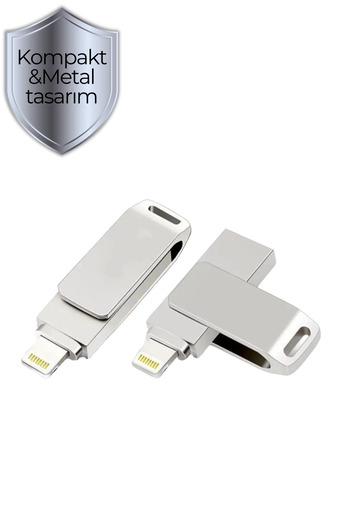
    Hello, is this USB metal?

    Answer from Ocado

    metal sir

    Translated by Google

    Why is there no sound in the videos?

    Answer from Ocado

    Sir, can you plug the product into the computer, format it in EXFAT format and try again? There may be a problem with your video formats. Under normal circumstances, you should not experience such a problem.

    Translated by Google

    Hello, how much does the product weigh?

    Answer from Ocado

    35 grams sir

    Translated by Google

    I couldn't do it there either, there is no clear information on how to do it exactly.

    Answer from Ocado

    First, download the i Flash Device HD application. While downloading, give all the necessary permissions. Open the application and plug the product into your phone. After the product is online, enter the album section. There, you can start the transfer by clicking 'copy' after selecting the pictures one by one, whether you want to transfer albums or go inside the albums, and then click the 'paste' button. You can transfer all the pictures and videos by clicking the 'one click backup' button at the bottom of the album section.

    Translated by Google

    Hello, after doing some repairs, the phone's battery died and it turned off. How can I find out which pictures and videos are left?

    Answer from Ocado

    YOU CAN LEARN IT AFTER OPENING IT, SIR, I THINK YOU SHOULD START THE PROCESS FROM THE BEGINNING

    Translated by Google

    If I format it on the computer, will the y-disks I copied be deleted? What I copied on the Y-disk does not appear on the phone.

    Answer from Ocado

    It will be deleted sir

    Translated by Google

    My phone is iPhone 13 pro. I want to transfer my photos and videos to flash. I have a flash. Will it be useful for me if I buy this product? Can you give me information about its use?

    Answer from Ocado

    First, download the i Flash Device HD application. While downloading, give all the necessary permissions. Open the application and plug the product into your phone. After the product is online, enter the album section. There, you can start the transfer by clicking 'copy' after selecting the pictures one by one, whether you want to transfer albums or go inside the albums, and then click the 'paste' button. You can transfer all the pictures and videos by clicking the 'one click backup' button at the bottom of the album section.

    Translated by Google

    It arrived, I downloaded the application, if I delete the application after backing up, will the copy be gone?

    Answer from Ocado

    no sir it stays inside

    Translated by Google

    I can't assign anything from local storage to external storage. It does not activate when imported, but there is no problem when you throw it locally from outside. I tried to transfer it using the copy method, but when I do so, the quality decreases. Can you help me?

    Answer from Ocado

    First, download the i Flash Device HD application. While downloading, give all the necessary permissions. Open the application and plug the product into your phone. After the product is online, enter the album section. There, you can start the transfer by clicking 'copy' after selecting the pictures one by one, whether you want to transfer albums or go inside the albums, and then click the 'paste' button. You can transfer all the pictures and videos by clicking the 'one click backup' button at the bottom of the album section.

    Translated by Google

    Can I burn the big end of the calvye?

    Answer from Ocado

    The USB end is for connecting to the computer, sir, it cannot be plugged into anything external.

    Translated by Google

    Hello, can you help me with usage?

    Answer from Ocado

    First, download the i Flash Device HD application. While downloading, give all the necessary permissions. Open the application and plug the product into your phone. After the product is online, enter the album section. There, you can start the transfer by clicking 'copy' after selecting the pictures one by one, whether you want to transfer albums or go inside the albums, and then click the 'paste' button. You can transfer all the pictures and videos by clicking the 'one click backup' button at the bottom of the album section.

    Translated by Google

    Which application should we download?

    Answer from Ocado

    First, download the i Flash Device HD application. While downloading, give all the necessary permissions. Open the application and plug the product into your phone. After the product is online, enter the album section. There, you can start the transfer by clicking 'copy' after selecting the pictures one by one, whether you want to transfer albums or go inside the albums, and then click the 'paste' button. You can transfer all the pictures and videos by clicking the 'one click backup' button at the bottom of the album section.

    Translated by Google

    Hello, why does it say that the application is not installed when I plug it in?

    Answer from Ocado

    First, download the i Flash Device HD application. While downloading, give all the necessary permissions. Open the application and plug the product into your phone. After the product is online, enter the album section. There, you can start the transfer by clicking 'copy' after selecting the pictures one by one, whether you want to transfer albums or go inside the albums, and then click the 'paste' button. You can transfer all the pictures and videos by clicking the 'one click backup' button at the bottom of the album section.

    Translated by Google

    How to use it? I couldn't transfer pictures.

    Answer from Ocado

    First, download the i Flash Device HD application. While downloading, give all the necessary permissions. Open the application and plug the product into your phone. After the product is online, enter the album section. There, you can start the transfer by clicking 'copy' after selecting the pictures one by one, whether you want to transfer albums or go inside the albums, and then click the 'paste' button. You can transfer all the pictures and videos by clicking the 'one click backup' button at the bottom of the album section.

    Translated by Google

    Hello, is it possible to transfer via WhatsApp conversation etc?

    Answer from Ocado

    Unfortunately, no

    Translated by Google

    I have a google account does it download those pictures on my i phone?

    Answer from Ocado

    No, you have to download those pictures to your phone first

    Translated by Google

    When we plug this into the phone, can we send photos from the phone without any other tool?

    Answer from Ocado

    Yes

    Translated by Google

    What is its application?

    Answer from Ocado

    i flash device hd

    Translated by Google

    Well, after installing the application and completing the process, can we delete the program? And when I plug it into the TV, do the videos work and the pictures appear? Thank you. I will buy it accordingly.

    Answer from Ocado

    THE TV DOES NOT WORK, PRODUCT EFNED. YOU CAN DELETE THE APPLICATION BUT IF YOU WANT TO SEE THE IMAGES ON THE PHONE AGAIN, YOU NEED TO INSTALL THE APPLICATION.

    Translated by Google

    Hello, the disk I bought from you, imextech 128 GB, is returning the ydisk application for use. Which application should I use? I bought it on February 29, 2024

    Answer from Ocado

    If you have upgraded your phone to iOS 26, it will not work sir.

    Translated by Google

    After backing up the products, can we transfer them to the PC, then delete the contents of the memory and transfer them again from the phone?

    Answer from Ocado

    Yes

    Translated by Google

    In most of the comments, they wrote that it does not download without the application. Does the application work like that? Is there a situation where it does not open?

    Answer from Ocado

    It works with the application sir

    Translated by Google

    Is the app paid and does it take up a lot of space on the phone?

    Answer from Ocado

    Free sir does not take up space

    Translated by Google

    I also downloaded the i flash device app. But the flash memory does not appear.

    Answer from Ocado

    Dear customer, you need to give all the necessary permissions when downloading the application. Also, there should be no dust, dirt, etc. in the lighting port of your phone. I also request you to plug the product into the computer and format it before plugging it into the phone.

    Translated by Google

    Does the product require an application to work on a PC or is it just plug and play? And on Apple 13, I upload photos by copying and pasting only through the application. After doing these, can I delete the photos from my phone with peace of mind?

    Answer from Ocado

    No PC application required, sir. Please delete your pictures after uploading them to your PC, sir.

    Translated by Google

    Can I watch videos in the car

    Answer from Ocado

    It does not work in the vehicle, sir.

    Translated by Google

    product-card-placeholder

    Product details

    Product description

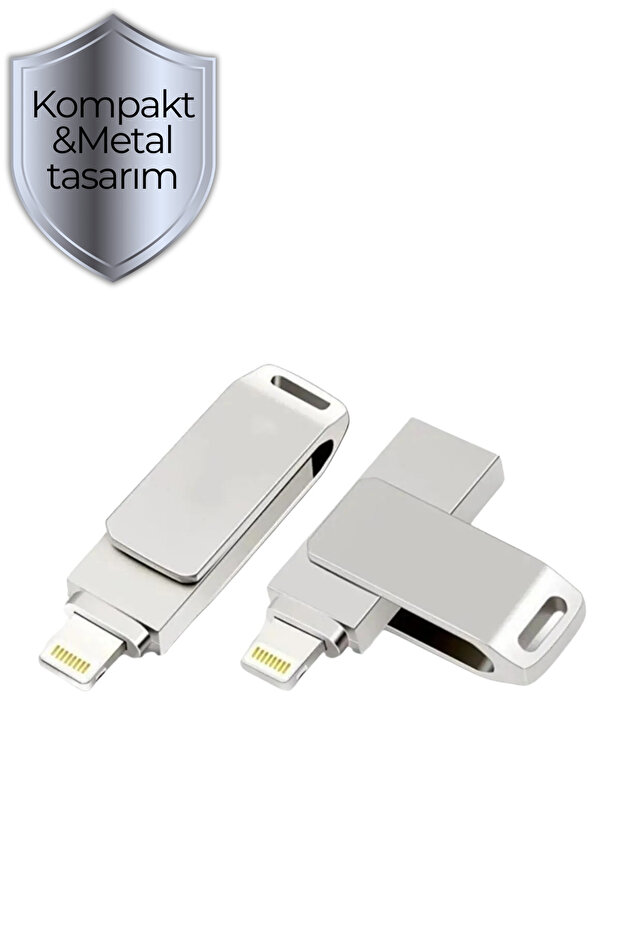
    Back up your photos and videos from your iphone and ipad!

    ios-compatible metallic flash memory is an ideal backup solution for your iphone and ipad devices.

    you can easily back up your photos and videos that fill up your device's memory, and you can also save your new videos and photos directly to the flash memory.

    secure encryption for private files

    the flash drive features secure encryption to protect your private files.

    you can open, copy, move, delete and rename your files.

    easy installation and use, just insert the flash drive into your for iphone or ipad device, then you can start to use it after installing the app on your phone

    for android devices, you can use it by clicking on the notification when you insert the flash memory. Features:

    compatible with ios

    128 gb storage space

    fast data transfer

    secure encryption

    easy installation and use

    usage areas:

    photo and video backup

    file transfer

    data security
    Additional info

    • The selling price on Trendyol already includes the export-related costs.
    • Sold by .
    • Made in Türkiye
    • Products may subject to different warranty terms in different regions. Please note that products that are shipped from Turkey with micro export are not eligible for warranty.
    • A maximum of 5 units of this product can be ordered. Trendyol reserves the right to cancel orders over 5 units.
    • Barcode No: 128gbocadootggray
    • Origin: TR

    Ocado 128 GB Flash Memory iPhone - PC Compatible OTG Flash 3.0 Usb Data Memory features

    Capacity
    128 GB
    Warranty Type
    Importer Guaranteed
    Reading Speed
    50 MB/s and below
    Input/Output Ports
    USB TypeA + Lightning
    Write Speed
    50 MB/s and below
    Color
    Gray
    Warranty Period
    2 years
    Origin
    TR

    Safety information

    Product safety information