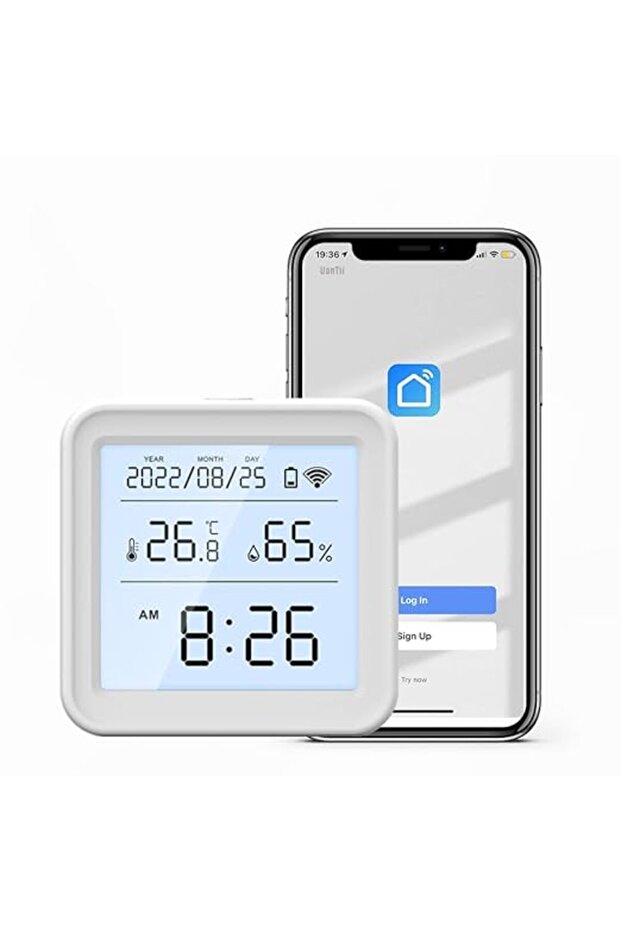


UanTii Zigbee Temperature Humidity Sensor Tuya Smart Indoor Hygrometer Thermometer Detector With Backlight,App Remote Control,Support Alexa Google Home,Zigbee Hub Required (Zigbee Version)
Only 2 left!
Lowest price in 14 days
162.68
AED
166.00
(incl. VAT)

Free shipping & Delivery

Trendyol's commitments

Shopping security

Secure payment
Privacy protection
Safe delivery
Refund for lost and damaged packages
Coupon for late delivery

Free returns
Easy and free return in 15 days.
Highlighted features:
UanTii Zigbee Temperature Humidity Sensor Tuya Smart Indoor Hygrometer Thermometer Detector With Backlight,App Remote Control,Support Alexa Google Home,Zigbee Hub Required (Zigbee Version) features
LCD Screen
Available
Bluetooth
No
Type
Ambient Thermometer & Humidity Meter
Other Features
Zigbee Hub Required, Real-time reporting, Data logging, Portable design, Tabletop and wall-mountable, Celsius/Fahrenheit unit conversion, Smart home automation data source
Instructions for Use/Warnings
Zigbee Hub required. Powered by 3 x 1.5V AAA batteries (not included). How to use: 1. Download the App “Smart Life”. 2. Power the device until the light flashes quickly. 3. Open the App, click “add device”. 4. Input 2.4ghz wifi password. 5. Connect. After configuration, it will detect and show data within half an hour. The sensor is not always connected to WiFi; it closes the connection when not needed. Backlight is triggered by touching the reset button once and lasts for about 10 seconds. Temperature display conversion function of Celsius and Fahrenheit is available.
Origin
CN
Product details
UanTii Zigbee Temperature Humidity Sensor Tuya Smart Indoor Hygrometer Thermometer Detector With Backlight,App Remote Control,Support Alexa Google Home,Zigbee Hub Required (Zigbee Version) features
LCD Screen
Available
Bluetooth
No
Type
Ambient Thermometer & Humidity Meter
Other Features
Zigbee Hub Required, Real-time reporting, Data logging, Portable design, Tabletop and wall-mountable, Celsius/Fahrenheit unit conversion, Smart home automation data source
Instructions for Use/Warnings
Zigbee Hub required. Powered by 3 x 1.5V AAA batteries (not included). How to use: 1. Download the App “Smart Life”. 2. Power the device until the light flashes quickly. 3. Open the App, click “add device”. 4. Input 2.4ghz wifi password. 5. Connect. After configuration, it will detect and show data within half an hour. The sensor is not always connected to WiFi; it closes the connection when not needed. Backlight is triggered by touching the reset button once and lasts for about 10 seconds. Temperature display conversion function of Celsius and Fahrenheit is available.
Origin
CN
Safety information
Product safety information