


Free shipping
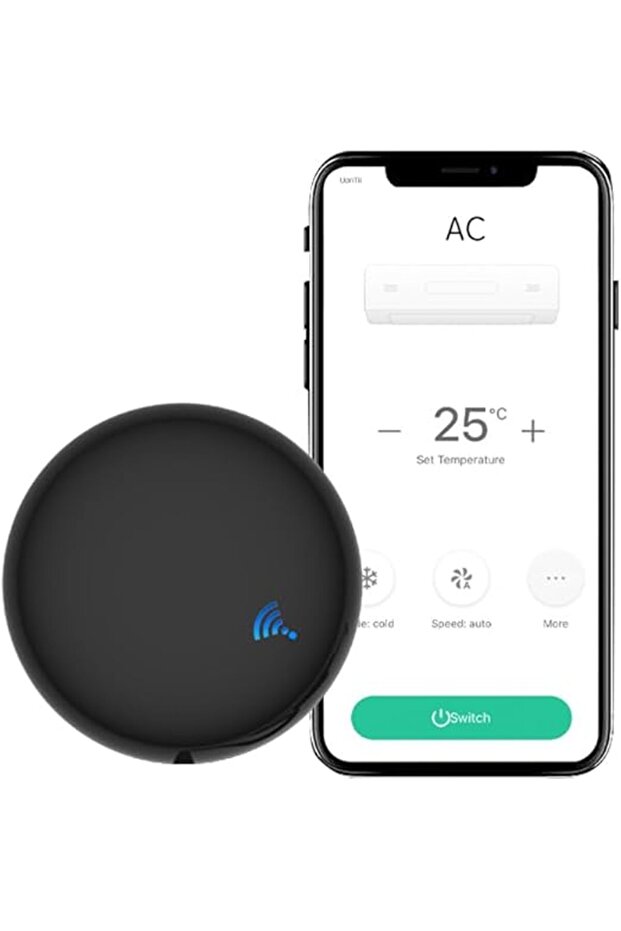


UanTii Smart IR Remote Control Tuya Wifi Infrared Universal Remote Controller for AC TV Smart AC Controller
No reviews yet.
Only 2 left!
-10%
99.90
AED
111
(incl. VAT)
Delivery address
Free shipping
Select your address, find out the delivery date!
Local delivery
Trendyol's commitments
Easy and free return in 15 days.
Payment methods



Coupons
Highlighted features:
UanTii Smart IR Remote Control Tuya Wifi Infrared Universal Remote Controller for AC TV Smart AC Controller features
Warranty Period
Not specified
Voice Control
There is
Use
Interior Space
Energy Consumption Notification
None
Warranty Type
None
Other Features
App and voice control; Smart AC; Timing; Massive IR Code Database (4000+ brands, 50000+ IR Code, DIY learning, Customizing button, Copy function); App Remote Control; Voice Control (Amazon Alexa, Google Home, Yandex Alice support); No hub needed; Easy installation and app setup (Wifi+Bluetooth pairing, auto scan); Scenario and Automation in App (link with other Tuya devices)
Instructions for Use/Warnings
Power Adapter not included (Input: DC 5V/1A Micro USB). Connect to 2.4GHz Wi-Fi. How to connect to the App: 1. Download the App Smart Life or Tuya Smart; Connect the phone to 2.4ghz wifi and turn on bluetooth. 2. Power the device, the light will flash; 3. Open the App, Click “add device” and the device will automatically show up, find the device and connect it; 4. Add IR home appliances such as AC, TV etc. 5. Use DIY function if you can't find your home appliance brand. How to use schedule to turn on/off the AC automatically: Open the App---Scene--Create Scene---Schedule---If then--control single device---choose AC--open/close-save.
Origin
CN
Shoppers also viewed





 H6C Pan & Tilt Smart Home Camera, CS-H6C-R101-1G2WF


UanTii Smart IR Remote Control Tuya Wifi Infrared Universal Remote Controller for AC TV Smart AC Controller reviews
No reviews yet.
Product details
Product description
Massive IR Code Database: Support AC,TV,Fan,Set box,etc as long as your home appliance has IR remote control
Support 4000+ brands, 50000+ IR Code on cloud, DIY learning is supported, Customizing button and Copy function in the "
Smart Life"
App.
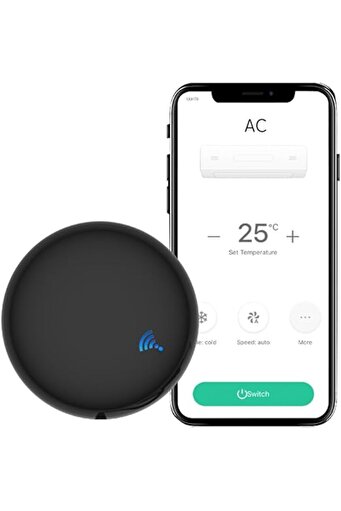
App Remote Control: Remote Control your home appliances by using "
Smart Life"
App in your smart phone anywhere anytime.
For example: Switch on home A/C in advance, enjoying the comfortable temperature once you get home.
Voice Control: By connecting Intelligent speaker, such as Alexa, Works with Google Home, Yandex Alice, you can control your home appliances by voice.
No hub needed, Easy to install and add to app: Support Wifi+Bluetooth 2way to pair the device, just power the device and then select the app's "
auto scan"
function to find device.
The whole process takes only a few seconds.
Schedule: Create Scene in the App, use schedule function to turn on/off your AC,TV automatically
Open the App-click scene-create scene-click schedule.
Scenario and Automation in App: By creating an "
Scene"
in the App,link with your other Tuya devices, you could control multiple devices with one tap.
Product Parameter: Input: DC 5V/1A(Micro USB , Power Adapter not included)
IR Remote Control Distance: ≤10m
Connection: Wi-Fi IEEE 802.11 b/g/n 2.4GHz
App: Smart Life、Tuya
Voice Control Support: Alexa,Works with Google Home, Yandex Alice.
How to connect to the App: 1
Download the App Smart Life or Tuya Smart
Connect the phone to 2.4ghz wifi and turn on bluetooth.
2.Power the device the light will flash
3.Open the App, Click “add device” and the device will automatically show up, find the device and connect it
4.Add IR home appliances such as AC, TV etc.
5.Use DIY function if you can't find you home appliance brand.
How to use schedule to turn on/off the AC automatically: Open the App---Scene--Create Scene---Schedule---If then--control single device---choose AC--open/close-save.
Additional info
- Sold by .
- A maximum of 5 units of this product can be ordered. Trendyol reserves the right to cancel orders over 5 units.
- Barcode No: PMP41K6D4J9IN1HY20
- Origin: CN
UanTii Smart IR Remote Control Tuya Wifi Infrared Universal Remote Controller for AC TV Smart AC Controller features
Warranty Period
Not specified
Voice Control
There is
Use
Interior Space
Energy Consumption Notification
None
Warranty Type
None
Other Features
App and voice control; Smart AC; Timing; Massive IR Code Database (4000+ brands, 50000+ IR Code, DIY learning, Customizing button, Copy function); App Remote Control; Voice Control (Amazon Alexa, Google Home, Yandex Alice support); No hub needed; Easy installation and app setup (Wifi+Bluetooth pairing, auto scan); Scenario and Automation in App (link with other Tuya devices)
Instructions for Use/Warnings
Power Adapter not included (Input: DC 5V/1A Micro USB). Connect to 2.4GHz Wi-Fi. How to connect to the App: 1. Download the App Smart Life or Tuya Smart; Connect the phone to 2.4ghz wifi and turn on bluetooth. 2. Power the device, the light will flash; 3. Open the App, Click “add device” and the device will automatically show up, find the device and connect it; 4. Add IR home appliances such as AC, TV etc. 5. Use DIY function if you can't find your home appliance brand. How to use schedule to turn on/off the AC automatically: Open the App---Scene--Create Scene---Schedule---If then--control single device---choose AC--open/close-save.
Origin
CN
Safety information
Product safety information