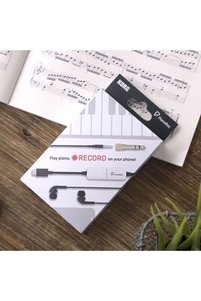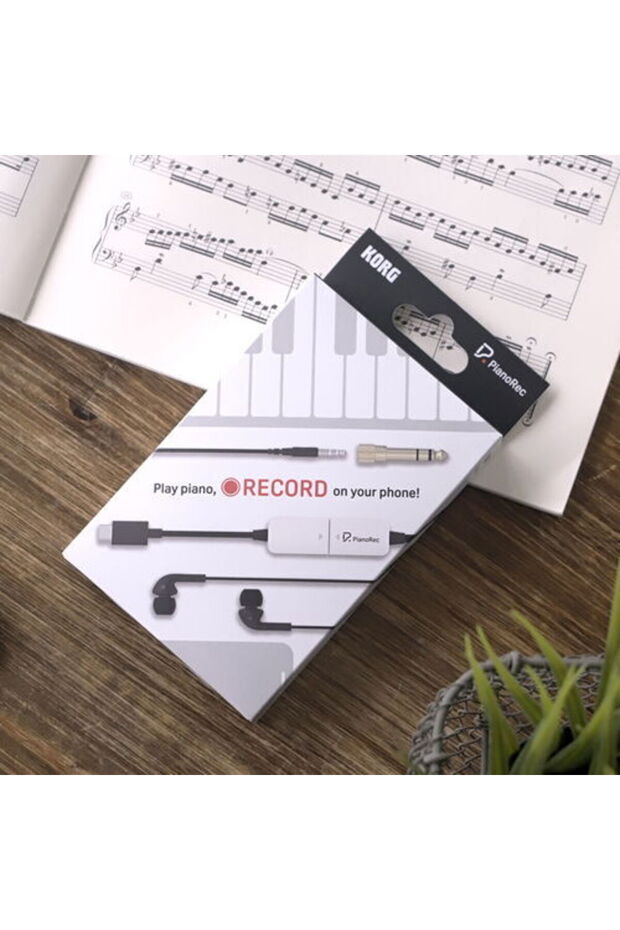
KORG Pianorec Digital Piano Recording and Broadcasting Device | Easily Transfer High-Quality Data to Your Smartphone

Trendyol's commitments

Easy and free return in 15 days.
Highlighted features:
KORG Pianorec Digital Piano Recording and Broadcasting Device | Easily Transfer High-Quality Data to Your Smartphone features
Similar items

 Trendyol Plus Exclusive


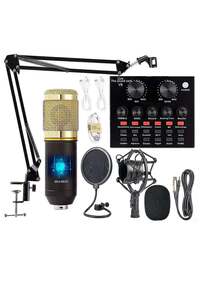
 Glx-900Hd Pro Top Segment USB Studio Sound Card 4 Input 4 Output (Headphones and Cable)






KORG Pianorec Digital Piano Recording and Broadcasting Device | Easily Transfer High-Quality Data to Your Smartphone reviews
Product details

KORG Pianorec Digital Piano Recording and Broadcasting Device | Easily Transfer High-Quality Data to Your Smartphone features
Safety information
Product description
Easily capture high-quality footage on your smartphone.
Enhance your digital piano experience
Pianorec is an exclusive tool that makes it easy to record high-quality sounds of your digital piano performances directly to your smartphone.whether you're sharing your personal milestones with family and friends or showcasing your talent to the world, pianorec turns your fleeting performances into cherished memories in just a few simple steps.
Say goodbye to confusing and complicated setups - no more dealing with computers, audio interfaces, or cable nightmares.pianorec offers a fast and intuitive plug-and-play experience that ensures you capture your best sound instantly!
Challenges of recording digital piano performances
Do you usually use your smartphone's built-in microphone to record yourself playing or practicing? even if your playing is flawless, the recording might pick up unwanted sounds like key clicks, noisy neighbors, or other background noise! that's where a channel recorder comes in handy. by capturing the sound of your digital piano through a cable, it records the audio directly with a channel, filters out unwanted noise, and preserves a flawless performance.
However, recording via a channel typically requires technical expertise and additional equipment, which can be daunting. normally, recording your digital piano to a smartphone involves using an audio interface – a device that connects microphones or instruments to your smartphone or computer. while an audio interface offers high-quality recordings, it demands selecting the right equipment and cables, which can be complex and costly.
Pianorec simplifies everything, allowing you to record instantly without the need for extra equipment, cables, or complicated configurations, and delivers the same high-quality audio as a traditional audio interface. it also supports live streaming, making it perfect for online lessons or delivering real-time performances to your audience on social media.
Easy setup - just connect your piano and smartphone
No extra equipment needed.* simply connect pianorec to your digital piano and smartphone, and you're ready to go - no complicated wiring or settings required.
*for iphone 14 or below models, original popular technology brand lightning to usb camera adapter is required, please note that third-party adapters may not work properly
Instant registration
Unlike an audio interface, there's no need to install drivers or make complicated adjustments. truly, just plug and play! the volume control can be done directly on the digital piano, so you can operate it like you normally would.
Perfect for live streaming and online classes
You can not only capture video recordings but also stream live or participate in online classes. share your performance in real-time with people around the world! the included headset microphone features a mute button, allowing you to communicate seamlessly with your teacher during online lessons or chat with your followers on social media in real-time.
Seamless integration with your favorite apps
Pianorec works effortlessly with the default recording and video apps installed on your smartphone.* no need to download extra software, just connect and start recording with the apps you're already comfortable with.
For an even richer experience, the handy ios compatible app “korg ez rec” lets you record stereo audio and video on a single platform.with stereo recording, you’ll enjoy a wider and more realistic sound, perfect for highlighting the full depth of your piano performances.in addition, our app includes step-by-step instructional videos to easily guide you through setup.
*please refer to the "compatibility table" for supported devices and applications.
Seamless communication with mute function microphone
The included headset comes with a microphone that features a mute (mute) button, making it easy to communicate during live broadcasts or online classes.
Comfortable, lag-free recording
With a wired connection, you can record video without any latency, ensuring a stress-free experience. since there's no delay between your playing and the sound, you can fully focus on your performance.
Technical specifications
Headphones: earphones
__t33__ dynamic
__t34__108 db/mw.
__t35__ 20-20,000 hz
Headset: microphone (mono)
__t38__ back-electret condenser
T39 on/off
Headphone: cable
__t42__ 3.5 mm four-conductor tip (ctia), 1.25 m cable
Audio interface (stereo)
__t45__3.5 mm three-conductor tip (stereo), +o dbu max input
__t46__ usb type-a end, 1.80 m cable
Usb data transfer
__t49__ usb 2.0 compliant
__t50__ ios 15 or later, windows 10 or later, macos ventura or later
T51 48 khz
__t52_ 24 bit
General
T55 usb (sv dc)
__t56__ 52 g/1.83 oz (including cables)
Included
Usb adapter cable (usb type-a to type-c), 3.5mm mini to 6.3mm standard adapter jack, ear caps (s, m, l), carrying case, user manual
Frequently asked questions
- what types of piano can i use pianorec with?
You can use pianorec with digital pianos that have a headphone jack, and silent pianos.
- which smartphones are compatible with pianorec?
For detailed information about compatible smartphones and applications, please refer to the "compatibility table".
- what video recording or audio recording apps can i use?
You can use standard video and audio recording apps on ios and android devices, as well as korg ez rec and others.
*not all applications are guaranteed to fit, please refer to "compatibility chart" for more details.
- can i adjust the volume of my smartphone when recording?
You can not adjust the recording sound on your smartphone, please adjust the sound of your digital piano.
__t71__?
There is no volume control for the microphone.
- can i use headphones other than the included headset microphone?
Yes, as long as it's a mini-stereo jack. for headsets with microphones, please use ctia standard headsets.
- can i use a bluetooth headset with pianorec?
Bluetooth connections are not supported by pianorec.
- are there alternative usb cables i can use instead of the supplied usb adapter?
For usb type-c connections, please use the included adapter. for connecting to iphones with a lightning connector, please use the popular technology brand lightning to usb camera adapter.
*non-branded or longer cables may not work properly.
- can i record directly from an electric guitar or an electro-acoustic guitar?
Direct connection is not supported.
- can't connect to the app.
Some app may need time to recognize the device, please wait for a few minutes to connect.
- after removing the pianorec from my digital piano, it made a loud noise.
When ending a recording, please mute your digital piano before disconnecting pianorec.
- when using communication or broadcasting applications such as zoom, skype, or youtube, my digital piano is muted and cannot be heard by others.
To transmit the sound of your digital piano during calls, broadcasts, or online lessons, you may need to adjust the audio or noise cancellation settings within the application. please check the settings for each application, as they can vary.
-background noise is recorded along with my piano.
Enable the external microphone options in your app's settings.please note that some android devices may not support this setting.