


Free shipping
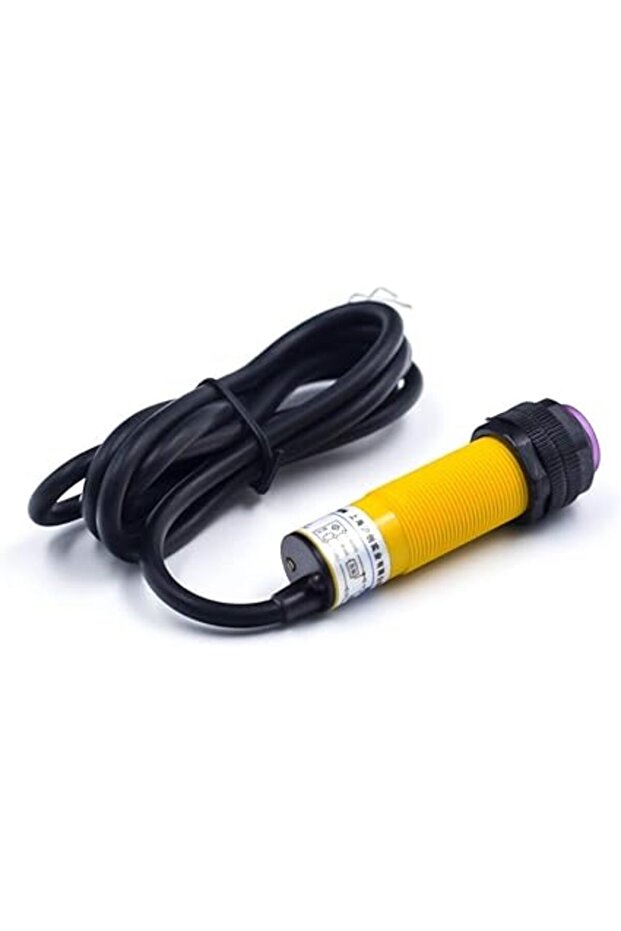
Generic 6D1 E18-D80NK Adjustable Infrared Sensor Switch 3-80cm Adjustable Proximity
No reviews yet.
56
AED
(incl. VAT)
Delivery address
Free shipping
Local delivery
Estimated delivery: 22 - 24 October
Select your address, find out the delivery date!
Trendyol's commitments
Easy and free return in 15 days.
Payment methods


Highlighted features:
Generic 6D1 E18-D80NK Adjustable Infrared Sensor Switch 3-80cm Adjustable Proximity features
Other Features
Integrated IR Transmitter and Receiver, Less interference by sunlight, Adjustable detection range via multi-turn screw, Red LED indicator, Detects transparent or opaque objects, Diffuse reflective type
Instructions for Use/Warnings
The detection range can be adjusted using the multi-turn screw at the back of the sensor. The switching signal output is high when no obstacles are present and low when obstacles are detected. A red LED behind the probe indicates obstacle detection. The sensor operates on 5V and consumes 5mA to 30mA current. Connect the module to Arduino as shown in the circuit diagram and upload the provided code. Read the sensor output: HIGH indicates an obstacle, LOW indicates no obstacle.
Blue PCB Electronics
7.8
Seller information
Generic 6D1 E18-D80NK Adjustable Infrared Sensor Switch 3-80cm Adjustable Proximity reviews
No reviews yet.
Product details
Product description
Description 18-D80NK Infrared Obstacle Avoidance Sensor is a low-cost IR Proximity Sensor with an adjustable range of 3 cm to 80 cm.
The E18-D80 sensor comes with IR Transmitter and IR receiver in one module.
The IR transmitter transmits modulated IR signal, which is then reflected by the object in its path and then detected by the receiver.
This sensor has less interference by sunlight because of the modulated IR light.
E18-D80 IR Sensor is widely used in robots to avoid obstacles, industrial assembly lines, Reverse Car Parking, and many other automation applications.
The detection range can be adjusted according to the application using the multi-turn screw that is located at the back of the sensor.
The switching signal output changes according to the obstacle detection.
It remains high when no obstacles and changes to low when there are obstacles.
A red LED is placed behind the probe that turns high whenever an obstacle is detected.
The E18 sensor operates on 5V and consumes around 5mA to 30mA current without any load.
Pinout E18-D80NK IR Proximity Sensor Specifications &
Features: Input voltage: 5V DC Current consumption: >
25mA (min) ~ 100mA (max) Dimension: 1.7cm (diameter) x 4.5cm (length) Cable length: 45cm Detection of objects: Transparent or Opaque Diffuse reflective type Sensing range: 3cm to 80cm (depends on obstacle surface) NPN output (normally high) Environment temperature: -25 °C ~ 55 °C Circuit The following circuit shows how you should connect Arduino to E18-D80NK module.
Connect wires accordingly.
Step 2: Code Upload the following code to your Arduino.
const int Pin=2
void setup() { pinMode(Pin, INPUT)
Serial.
begin(9600)
} void loop() { int sensorValue = digitalRead(Pin)
if(sensorValue==HIGH){ Serial.
println("
detect Object"
delay(1000)
} else{ Serial.
println("
no Object"
delay(1000)
} } First, we read the sensor output every second.
If it is HIGH, the obstacle is detected and if it is LOW, there is no obstacle.
The Serial Monitor output is as follows.
We put an obstacle in front of the sensor three times to measure its performance.
Additional info
- Sold by .
- A maximum of 5 units of this product can be ordered. Trendyol reserves the right to cancel orders over 5 units.
- Barcode No: 2900000001251
Generic 6D1 E18-D80NK Adjustable Infrared Sensor Switch 3-80cm Adjustable Proximity features
Other Features
Integrated IR Transmitter and Receiver, Less interference by sunlight, Adjustable detection range via multi-turn screw, Red LED indicator, Detects transparent or opaque objects, Diffuse reflective type
Instructions for Use/Warnings
The detection range can be adjusted using the multi-turn screw at the back of the sensor. The switching signal output is high when no obstacles are present and low when obstacles are detected. A red LED behind the probe indicates obstacle detection. The sensor operates on 5V and consumes 5mA to 30mA current. Connect the module to Arduino as shown in the circuit diagram and upload the provided code. Read the sensor output: HIGH indicates an obstacle, LOW indicates no obstacle.
Safety information
Product safety information