


Free shipping
Delivery address
Free shipping
Local delivery
Estimated delivery: 22 - 24 October
Select your address, find out the delivery date!
Trendyol's commitments
Easy and free return in 15 days.
Payment methods


Highlighted features:
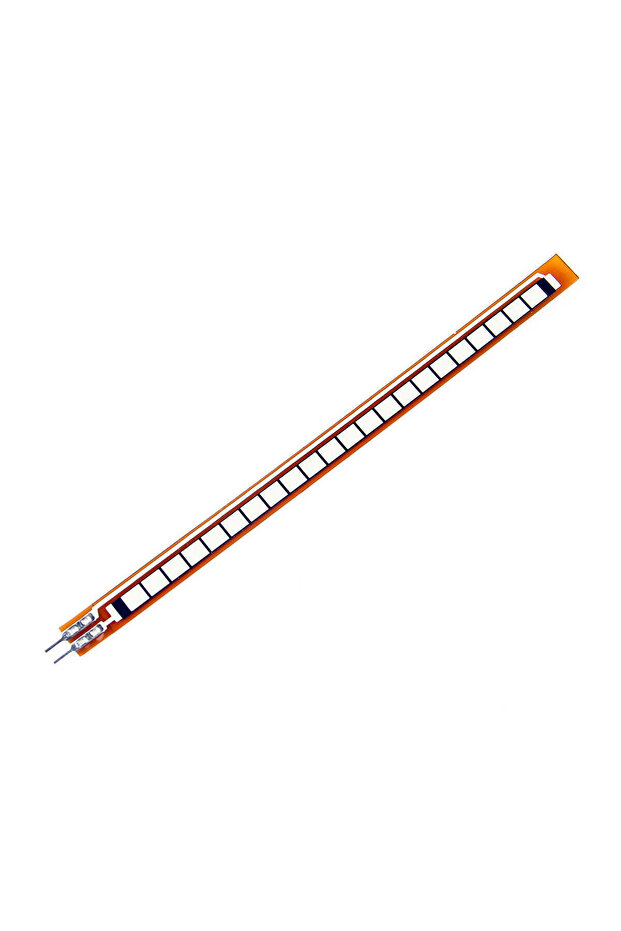
Generic 5B3 Flex Sensor 4.5" inch features
Other Features
Angle Displacement Measurement, Bends and Flexes physically with motion device, Simple Construction, Low Profile, Possible Uses: Robotics, Gaming (Virtual Motion), Medical Devices, Computer Peripherals, Musical Instruments, Physical Therapy
Instructions for Use/Warnings
For correct resistance change, ensure metal pads are on the outside of the bend (text on inside of bend). Incorporate the sensor into a voltage divider circuit using a resistor (e.g., 10KΩ to 100KΩ, 47kΩ suggested). Connect the resistor on the ground side and the flex sensor on the 5V side. Use the provided Arduino example code, upload it, then open the serial monitor and set the baud rate to 9600 bps. For accurate readings, calibrate constants such as VCC, R_DIV, STRAIGHT_RESISTANCE, and BEND_RESISTANCE. Refer to the datasheet for full specifications.
Origin
US
Blue PCB Electronics
7.8
Seller information
Shoppers also viewed


 Collage Series 13 - the Islamic Notebook That Will Make God Pleased with You (with Verses and Hadiths)













Generic 5B3 Flex Sensor 4.5" inch reviews
No reviews yet.
Product details

Product description
4.5 Inch Flex Sensor Description: A simple flex sensor 4.5 inch in length made by SPARKFUN.
As the sensor is flexed, the resistance across the sensor increases.
The resistance of the flex sensor changes when the metal pads are on the outside of the bend (text on inside of bend).
Connector is 0.1"
spaced and bread board friendly.
Check datasheet for full specifications.
Features: 1. Angle Displacement Measurement 2. Bends and Flexes physically with motion device 3. Possible Uses 4. Robotics 5. Gaming (Virtual Motion) 6. Medical Devices 7. Computer Peripherals 8. Musical Instruments 9. Physical Therapy 10. Simple Construction 11. Low Profile Here is the schemetics: Package included: 1 x 4.5 Inch Flex Sensor Example Circuit The simplest way to incorporate this sensor into your project is by using it in a voltage divider.
This circuit requires one resistor.
Many values from 10KΩ to 100KΩ will work.
If you have a resistor kit, you may want to introduce some trial-and-error to hone in on that perfect static resistance.
A value between the minimum and maximum resistance values is usually a good choice.
We'll use a 47kΩ resistor in this example.
Here's the hookup: And a schematic: The 47kΩ resistor on the ground side, and the flex sensor on the 5V side, means as the flex sensor's resistance increases (meaning the sensor is bending) the voltage on A0 will decrease.
Example Program Here is a simple Arduino example based on the circuit above.
Copy and paste this into your Arduino IDE, then upload! const int FLEX_PIN = A0
// Pin connected to voltage divider output // Measure the voltage at 5V and the actual resistance of your // 47k resistor, and enter them below: const float VCC = 4.98
// Measured voltage of Ardunio 5V line const float R_DIV = 47500.0
// Measured resistance of 3.3k resistor // Upload the code, then try to adjust these values to more // accurately calculate bend degree.
const float STRAIGHT_RESISTANCE = 37300.0
// resistance when straight const float BEND_RESISTANCE = 90000.0
// resistance at 90 deg void setup() { Serial.
begin(9600)
pinMode(FLEX_PIN, INPUT)
} void loop() { // Read the ADC, and calculate voltage and resistance from it int flexADC = analogRead(FLEX_PIN)
float flexV = flexADC * VCC / 1023.0
float flexR = R_DIV * (VCC / flexV - 1.0)
Serial.
println("
Resistance: "
+ String(flexR) + "
ohms"
// Use the calculated resistance to estimate the sensor's // bend angle: float angle = map(flexR, STRAIGHT_RESISTANCE, BEND_RESISTANCE, 0, 90.0)
Serial.
println("
Bend: "
+ String(angle) + "
degrees"
Serial.
println()
delay(500)
} After uploading, open your serial monitor, and set the baud rate to 9600 bps.
If you bend the flex sensor, you should see resistance and estimated angle calculations change: If the value's don't seem correct, make sure the constants VCC and, more importantly, R_DIV are accurate.
If you used something other than a 47kΩ resistor, enter that value in for R_DIV.
Through trial-and-error, try to hone in on more accurate values for STRAIGHT_RESISTANCE and BEND_RESISTANCE -- your flex sensor's resistance when it's straight and bent at 90°.
Additional info
- Sold by .
- A maximum of 5 units of this product can be ordered. Trendyol reserves the right to cancel orders over 5 units.
- Barcode No: 2900000007963
- Origin: US
Generic 5B3 Flex Sensor 4.5" inch features
Other Features
Angle Displacement Measurement, Bends and Flexes physically with motion device, Simple Construction, Low Profile, Possible Uses: Robotics, Gaming (Virtual Motion), Medical Devices, Computer Peripherals, Musical Instruments, Physical Therapy
Instructions for Use/Warnings
For correct resistance change, ensure metal pads are on the outside of the bend (text on inside of bend). Incorporate the sensor into a voltage divider circuit using a resistor (e.g., 10KΩ to 100KΩ, 47kΩ suggested). Connect the resistor on the ground side and the flex sensor on the 5V side. Use the provided Arduino example code, upload it, then open the serial monitor and set the baud rate to 9600 bps. For accurate readings, calibrate constants such as VCC, R_DIV, STRAIGHT_RESISTANCE, and BEND_RESISTANCE. Refer to the datasheet for full specifications.
Origin
US
Safety information
Product safety information