


Free shipping

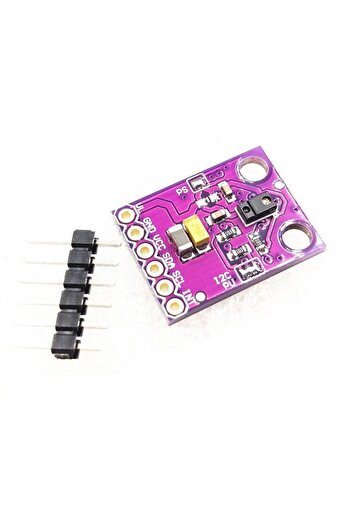
Generic 2D30 RGB Gesture Sensor APDS-9960 Detectoin Proximity Sensing Color
No reviews yet.
56
AED
(incl. VAT)
Delivery address
Free shipping
Local delivery
Estimated delivery: 21 - 23 October
Select your address, find out the delivery date!
Trendyol's commitments
Easy and free return in 15 days.
Payment methods


Highlighted features:
Generic 2D30 RGB Gesture Sensor APDS-9960 Detectoin Proximity Sensing Color features
Other Features
Multifunction (Gesture, Ambient Light, RGB Color Detection), I2C Communication Protocol, Low Power Consumption (1µA), 3.3V Operating Voltage, Interrupt Pin, Automatic Gesture Activation, Ambient Light Subtraction, Cross-talk Cancellation, Dual 8-bit Data Converters, 32-dataset FIFO, Adjustable IR LED Timing, Detection Range: 4-8 inches (10-20 cm)
Instructions for Use/Warnings
The sensor is powered by 3.3V; do not connect it with a 5V pin, as this may risk damaging the APDS-9960. When interfacing with Arduino UNO, connect the SDA Pin to A4, SCL to A5, and INT pin to D2. Leave VL on the breakout board unconnected. Install the Sparkfun library for APDS9960 from the Library Manager in Arduino IDE. After uploading the provided code, swipe your hand to left, right, forward, backward, near, or far. The Serial Monitor will display the Gesture data whenever an interrupt is detected.
Blue PCB Electronics
7.8
Seller information
Shoppers also viewed




 Collage Series 13 - the Islamic Notebook That Will Make God Pleased with You (with Verses and Hadiths)







Generic 2D30 RGB Gesture Sensor APDS-9960 Detectoin Proximity Sensing Color reviews
No reviews yet.
Product details
Product description
Description It is a multifunction sensor which can detect gestures, ambient light, RGB Color &
values in light.
This sensor consists of four photodiodes.
These photodiodes detect the reflected IR energy which is transmitted by an on-board LED.
So whenever any gesture is performed then this IR energy gets obstructed and reflects back to the sensor, now the sensor detects the velocity and direction information and converts it into digital information.
APDS-9960 also has a detection range of 4 to 8 inches (10 to 20 cm).
datasheet Architecture This sensor works on I2C communication protocol.
It consumes 1µA current and powered by 3.3V so be careful and do not connect it with 5V pin.
The INT pin here is interrupt pin, which is used to drive the I2C communication.
The architecture of the gesture engine features automatic activation (based on Proximity engine results), ambient light subtraction, cross-talk cancelation, dual 8-bit data converters, power-saving inter-conversion delay, 32-dataset FIFO, and interrupt-driven I2C communication.
Power consumption and noise are minimized with adjustable IR LED timing.
Pinouts The APDS9960 sensor has 6 pins.
Following are the function of pins.
Interfacing APDS9960 Sensor with Arduino We will be using the Arduino UNO Board for interfacing the APDS9960 Sensor.
We must use 3.3V to power the sensor.
If we try to use a 5V power supply we may risk damaging the APDS-9960. Connect the SDA Pin to A4 of Arduino &
SCL to A5. Connect its INT pin to D2. We are leaving VL on the breakout board unconnected.
Installing APDS9960 on Arduino IDE The Arduino library for APDS9960 is created by Sparkfun.
The library makes the APDS-9960 easy to use.
To install the library, go to the Library Manager in Arduino IDE &
install the following Sparkfun library as shown in the image below.
Code #include #include #define APDS9960_INT 2 // Needs to be an interrupt pin // Global Variables SparkFun_APDS9960 apds = SparkFun_APDS9960()
int isr_flag = 0
void setup() { // Initialize Serial port Serial.
begin(9600)
Serial.
println()
Serial.
println(F("
--------------------------------"
Serial.
println(F("
APDS-9960 - GestureTest"
Serial.
println(F("
--------------------------------"
// Initialize interrupt service routine attachInterrupt(0, interruptRoutine, FALLING)
// Initialize APDS-9960 (configure I2C and initial values) if ( apds.
init() ) { Serial.
println(F("
APDS-9960 initialization complete"
} else { Serial.
println(F("
Something went wrong during APDS-9960 init!"
} // Start running the APDS-9960 gesture sensor engine if ( apds.
enableGestureSensor(true) ) { Serial.
println(F("
Gesture sensor is now running"
} else { Serial.
println(F("
Something went wrong during gesture sensor init!"
} } void loop() { if( isr_flag == 1 ) { detachInterrupt(0)
handleGesture()
isr_flag = 0
attachInterrupt(0, interruptRoutine, FALLING)
} } void interruptRoutine() { isr_flag = 1
} void handleGesture() { if ( apds.
isGestureAvailable() ) { switch ( apds.
readGesture() ) { case DIR_UP: Serial.
println("
UP"
break
case DIR_DOWN: Serial.
println("
DOWN"
break
case DIR_LEFT: Serial.
println("
LEFT"
break
case DIR_RIGHT: Serial.
println("
RIGHT"
break
case DIR_NEAR: Serial.
println("
NEAR"
break
case DIR_FAR: Serial.
println("
FAR"
break
default: Serial.
println("
NONE"
} } } After uploading the code swipe your hand to left, right, forward, backward, near, far.
The Serial Monitor will display the Gesture data whenever an interrupt is detected.
Additional info
- Sold by .
- A maximum of 5 units of this product can be ordered. Trendyol reserves the right to cancel orders over 5 units.
- Barcode No: 2900000007451
Generic 2D30 RGB Gesture Sensor APDS-9960 Detectoin Proximity Sensing Color features
Other Features
Multifunction (Gesture, Ambient Light, RGB Color Detection), I2C Communication Protocol, Low Power Consumption (1µA), 3.3V Operating Voltage, Interrupt Pin, Automatic Gesture Activation, Ambient Light Subtraction, Cross-talk Cancellation, Dual 8-bit Data Converters, 32-dataset FIFO, Adjustable IR LED Timing, Detection Range: 4-8 inches (10-20 cm)
Instructions for Use/Warnings
The sensor is powered by 3.3V; do not connect it with a 5V pin, as this may risk damaging the APDS-9960. When interfacing with Arduino UNO, connect the SDA Pin to A4, SCL to A5, and INT pin to D2. Leave VL on the breakout board unconnected. Install the Sparkfun library for APDS9960 from the Library Manager in Arduino IDE. After uploading the provided code, swipe your hand to left, right, forward, backward, near, or far. The Serial Monitor will display the Gesture data whenever an interrupt is detected.
Safety information
Product safety information