


Free shipping

Delivery address
Free shipping
Local delivery
Estimated delivery: 23 - 26 October
Select your address, find out the delivery date!
Trendyol's commitments
Easy and free return in 15 days.
Payment methods


Highlighted features:
Generic 2D14 KY-001 DS18B20 Temperature Sensor Module features
Other Features
Arduino Compatible
Instructions for Use/Warnings
To use the DS18B20 Temperature Sensor Module with Arduino UNO: 1. Components needed: 1pcs Arduino UNO or Compatible, 1pcs DS18B20 Temperature Sensor Module, 3pcs Male to Female Jumper Cables. 2. Wiring: Connect the sensor to Arduino as follows: Y(S) to Arduino D12, G(-) to Arduino GND, R(+) to Arduino Power (3.3V/5V). Take care to match the pin numbers. 3. Software: Install OneWire and DallasTemperature libraries. 4. Coding: Upload the provided Arduino code to your board. The code initializes serial communication and the sensor, then continuously requests and prints temperature readings to the serial monitor. 5. Operation: Once the program is loaded and connections are made, the module will output temperature in Celsius to the serial monitor.
Blue PCB Electronics
7.7
Seller information
Shoppers also viewed


 Collage Series 13 - the Islamic Notebook That Will Make God Pleased with You (with Verses and Hadiths)














Generic 2D14 KY-001 DS18B20 Temperature Sensor Module reviews
No reviews yet.
Product details
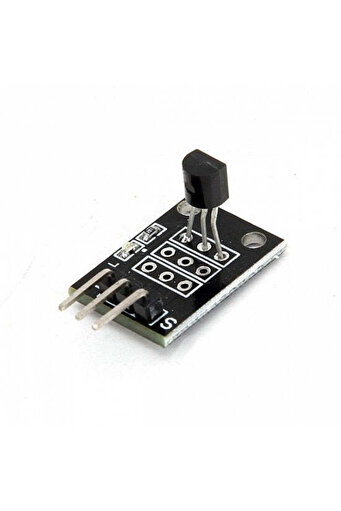
Product description
Features: Temperature Measurement Range: -55 ℃ ~ + 125 ℃.
Range Accuracy: ±0.5℃.
Working Power Supply: DC 3 ~ 5V.
Measurement results in 9 ~ 12 digital quantity way serial transmission.
Pins: (The pins silk print could be different from the picture, but it works the same.
) Y(S) - Arduino D12 G(-) - Arduino GND R(+) - Arduino Power (3.3V/5V) Dimensions: L 20 x W 11 x H 12mm Package Includes 1 x DS18B20 Temperature Sensor Module Workshop: The example will demonstrate the use of an Arduino UNO in requesting and interpreting data from a DS18b20 sensor.
Once connected and the program loaded, the serial monitor will display a live temperature readout.
This will use the OneWire library created by Paul Stoffregen and the DallasTemperature library created by Miles Burton.
Components 1pcs Arduino UNO or Compatible 1pcs DS18B20 Temperature Sensor Module 3pcs Male to Female Jumper Cables Wiring Wire the components together as can be seen in the image below, taking care to match the pin numbers.
Coding The code consists of the an include, definition, launch, setup and loop.
First the OneWire library and the DallasTemperature library are linked to the code.
The sensor pin is defined followed by the OneWire library and DallasTemperature library instances established.
The setup launches the serial connection and sensor connection.
The loop contains the control program that will run continuously after the setup.
It begins by requesting the information from the sensor instance.
It then prints the value to the serial monitor.
Load the code below into the Arduino IDE and upload it to your board.
/* A simple program designed to setup and demonstrate the DallasTemperature library and DS18b20 Temperature probe - BDAA100019 The program uses the OneWire and DallasTemperature libraries to request and output temperatures from a DS18b20 sensor to the serial monitor.
modified 24 October 2019 by Sebastian Karam - Flux Workshop The OneWire library created by Paul Stoffregen com/PaulStoffregen/OneWire The DallasTemperature library created by Miles Burton com/milesburton/Arduino-Temperature-Control-Library */ #include #include // Define the pin that the sensor pin #define ONE_WIRE_BUS 2 // Establish a oneWire instance OneWire oneWire(ONE_WIRE_BUS)
// Establish Dallas Temperature instance DallasTemperature sensors(&
oneWire)
void setup(void) { Serial.
begin(9600)
// Open a serial communication line sensors.
begin()
// Start up the DallasTemperature library } void loop(void){ sensors.
requestTemperatures()
// Request temperatures from the sensors instance Serial.
print("
Temperature (Celsius): "
// Print to the serial monitor Serial.
print(sensors.
getTempCByIndex(0))
// Print the temperature from the library to serial monitor Serial.
print("
\n"
// Print to the serial monitor delay(1000)
// Pause before restarting the loop } Running With the board is loaded with the program and all the connections made the module will begin to output a temperature in celcius.
The animation below shows a brief loop of the sensor being placed beside a cold cup of water then above a a hot cup of water and then back to the cold.
Additional info
- Sold by .
- A maximum of 5 units of this product can be ordered. Trendyol reserves the right to cancel orders over 5 units.
- Barcode No: 2900000006676
Generic 2D14 KY-001 DS18B20 Temperature Sensor Module features
Other Features
Arduino Compatible
Instructions for Use/Warnings
To use the DS18B20 Temperature Sensor Module with Arduino UNO: 1. Components needed: 1pcs Arduino UNO or Compatible, 1pcs DS18B20 Temperature Sensor Module, 3pcs Male to Female Jumper Cables. 2. Wiring: Connect the sensor to Arduino as follows: Y(S) to Arduino D12, G(-) to Arduino GND, R(+) to Arduino Power (3.3V/5V). Take care to match the pin numbers. 3. Software: Install OneWire and DallasTemperature libraries. 4. Coding: Upload the provided Arduino code to your board. The code initializes serial communication and the sensor, then continuously requests and prints temperature readings to the serial monitor. 5. Operation: Once the program is loaded and connections are made, the module will output temperature in Celsius to the serial monitor.
Safety information
Product safety information