


Free shipping

Delivery address
Free shipping
Local delivery
Estimated delivery: 21 - 23 October
Select your address, find out the delivery date!
Trendyol's commitments
Easy and free return in 15 days.
Payment methods


Highlighted features:
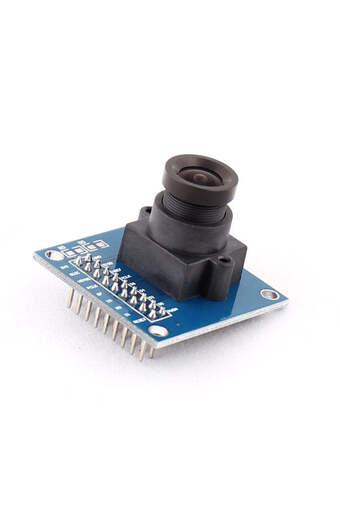
Generic 2C60006 OV7670 640 x 480 VGA CMOS Camera Module features
Instructions for Use/Warnings
Instructions for Use: Connect OV7670 Camera Module to Arduino UNO using specified resistors (10k, 4.7k) and jumpers. Use Arduino IDE for programming, including the library. Configure camera registers for desired resolution (e.g., QVGA) and color (e.g., monochrome). Use Serial Port Reader by connecting Arduino to PC, finding the COM Port, starting serial reading, and saving pictures. Warnings/Precautions: Use wires or jumpers as short as possible. Avoid loose contact to any pins on Arduino or OV7670. Be careful about connecting, as a large number of wires can lead to a short circuit. If the Arduino UNO gives 5V output to GPIO, use a Level Shifter. Use 3.3V Input for OV7670, as exceeding this voltage can damage the module. Note that Arduino has limited memory, so processing may not be as expected; consider using different controllers with more memory for processing.
Origin
US
Blue PCB Electronics
7.8
Seller information
Shoppers also viewed



Generic 2C60006 OV7670 640 x 480 VGA CMOS Camera Module reviews
No reviews yet.
Product details
Additional info
- Sold by .
- A maximum of 5 units of this product can be ordered. Trendyol reserves the right to cancel orders over 5 units.
- Barcode No: 2900000007420
- Origin: US
Generic 2C60006 OV7670 640 x 480 VGA CMOS Camera Module features
Instructions for Use/Warnings
Instructions for Use: Connect OV7670 Camera Module to Arduino UNO using specified resistors (10k, 4.7k) and jumpers. Use Arduino IDE for programming, including the library. Configure camera registers for desired resolution (e.g., QVGA) and color (e.g., monochrome). Use Serial Port Reader by connecting Arduino to PC, finding the COM Port, starting serial reading, and saving pictures. Warnings/Precautions: Use wires or jumpers as short as possible. Avoid loose contact to any pins on Arduino or OV7670. Be careful about connecting, as a large number of wires can lead to a short circuit. If the Arduino UNO gives 5V output to GPIO, use a Level Shifter. Use 3.3V Input for OV7670, as exceeding this voltage can damage the module. Note that Arduino has limited memory, so processing may not be as expected; consider using different controllers with more memory for processing.
Origin
US
Safety information
Product safety information