


Free shipping

Electronic Circuit Element category
#1 Most viewed
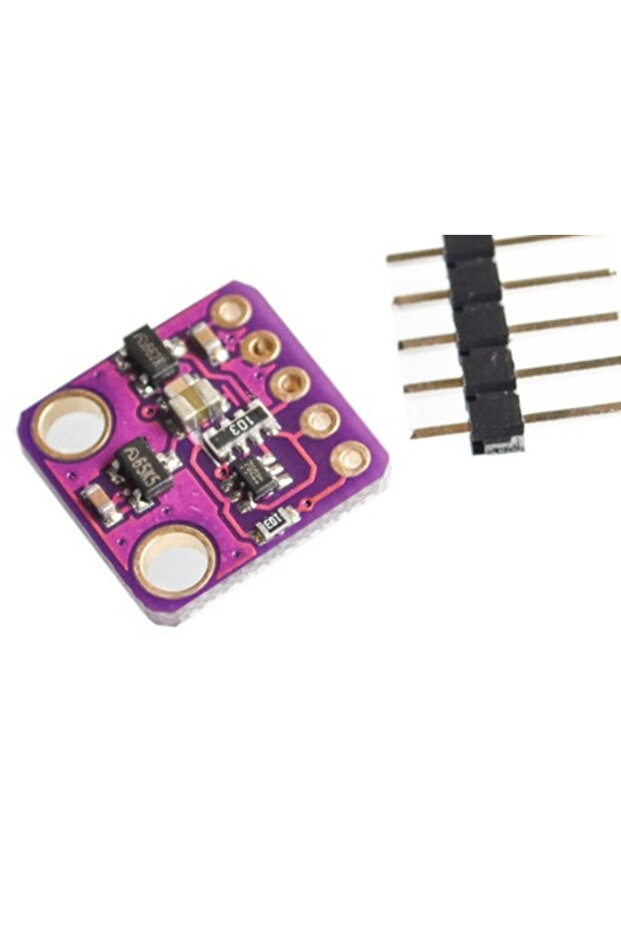
Generic 2A9 GY-MAX30100 Heart Rate Click Sensor
No reviews yet.
56
AED
(incl. VAT)
Delivery address
Free shipping
Local delivery
Estimated delivery: 22 - 24 October
Select your address, find out the delivery date!
Trendyol's commitments
Easy and free return in 15 days.
Payment methods


Highlighted features:
Generic 2A9 GY-MAX30100 Heart Rate Click Sensor features
Other Features
1.8V and 3.3V operation, Ultra-Low Shutdown Current (0.7µA), Fast Data Output Capability, I2C Interface
Instructions for Use/Warnings
Connect the Vin pin of MAX30100 to Arduino 5V or 3.3V pin, GND to GND. Connect the I2C Pin, SCL & SDA of MAX30100 to A5 & A4 of Arduino. Similarly connect the LCD pin 1, 5, 16 to GND of Arduino and 2, 15 to 5V VCC. Similarly connect LCD pin 4, 6, 11, 12, 13, 14 to Arduino pin 13, 12, 11, 10, 9, 8. Use 10K Potentiometer at pin 3 of LCD to adjust the contrast of LCD. After uploading the code, put your finger on the MAX30100 Sensor and the LCD will start displaying the Oxygen percentage and BPM Value.
Blue PCB Electronics
7.8
Seller information
Similar items




 Apple Lightning Compatible USB 3.0 (High Speed) Data Transfer Otg Converter Converter Adapter









Generic 2A9 GY-MAX30100 Heart Rate Click Sensor reviews
No reviews yet.
Product details
Product description
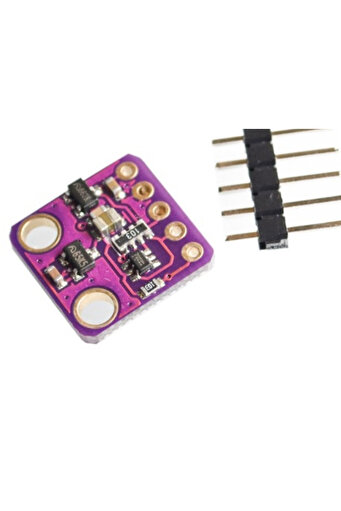
Description The sensor is an integrated pulse oximetry and heart rate monitor sensor solution.
It combines two LED’s, a photodetector, optimized optics, and low-noise analog signal processing to detect pulse and heart-rate signals.
It operates from 1.8V and 3.3V power supplies and can be powered down through software with negligible standby current, permitting the power supply to remain connected at all times.
Features 1. Consumes very little power (operates from 1.8V and 3.3V) 2. Ultra-Low Shutdown Current (0.7µA, type) 3. Fast Data Output Capability 4. Interface Type: I2C Displaying MAX30100 SpO2 &
BPM Value on LCD Display Now let us use the 16X2 LCD Display to see the value of BPM &
SpO2 instead of Serial Monitor.
Assemble the circuit as per the circuit diagram below.
Connect the Vin pin of MAX30100 to Arduino 5V or 3.3V pin, GND to GND.
Connect the I2C Pin, SCL &
SDA of MAX30100 to A5 &
A4 of Arduino.
Similarly connect the LCD pin 1, 5, 16 to GND of Arduino and 2, 15 to 5V VCC.
Similarly connect LCD pin 4, 6, 11, 12, 13, 14 to Arduino pin 13, 12, 11, 10, 9, 8. Use 10K Potentiometer at pin 3 of LCD to adjust the contrast of LCD.
Source Code/Program #include #include #include "
MAX30100_PulseOximeter.
h"
LiquidCrystal lcd(13, 12, 11, 10, 9, 8)
#define REPORTING_PERIOD_MS 1000 PulseOximeter pox
uint32_t tsLastReport = 0
void onBeatDetected() { Serial.
println("
Beat!"
} void setup() { Serial.
begin(115200)
Serial.
print("
Initializing pulse oximeter.
"
lcd.
begin(16,2)
lcd.
print("
Initializing.
"
delay(3000)
lcd.
clear()
// Initialize the PulseOximeter instance // Failures are generally due to an improper I2C wiring, missing power supply // or wrong target chip if (!pox.
begin()) { Serial.
println("
FAILED"
for(
} else { Serial.
println("
SUCCESS"
} pox.
setIRLedCurrent(MAX30100_LED_CURR_7_6MA)
// Register a callback for the beat detection pox.
setOnBeatDetectedCallback(onBeatDetected)
} void loop() { // Make sure to call update as fast as possible pox.
update()
if (millis() - tsLastReport >
REPORTING_PERIOD_MS) { Serial.
print("
Heart rate:"
Serial.
print(pox.
getHeartRate())
Serial.
print("
bpm / SpO2:"
Serial.
print(pox.
getSpO2())
Serial.
println("
%"
lcd.
clear()
lcd.
setCursor(0,0)
lcd.
print("
BPM : "
lcd.
print(pox.
getHeartRate())
lcd.
setCursor(0,1)
lcd.
print("
SpO2: "
lcd.
print(pox.
getSpO2())
lcd.
print("
%"
tsLastReport = millis()
} } After uploading the code, you can put the finger on MAX30100 Sensor and LCD will start displaying the Oxygen percentage and BPM Value.
Additional info
- Sold by .
- A maximum of 5 units of this product can be ordered. Trendyol reserves the right to cancel orders over 5 units.
- Barcode No: 2900000005938
Generic 2A9 GY-MAX30100 Heart Rate Click Sensor features
Other Features
1.8V and 3.3V operation, Ultra-Low Shutdown Current (0.7µA), Fast Data Output Capability, I2C Interface
Instructions for Use/Warnings
Connect the Vin pin of MAX30100 to Arduino 5V or 3.3V pin, GND to GND. Connect the I2C Pin, SCL & SDA of MAX30100 to A5 & A4 of Arduino. Similarly connect the LCD pin 1, 5, 16 to GND of Arduino and 2, 15 to 5V VCC. Similarly connect LCD pin 4, 6, 11, 12, 13, 14 to Arduino pin 13, 12, 11, 10, 9, 8. Use 10K Potentiometer at pin 3 of LCD to adjust the contrast of LCD. After uploading the code, put your finger on the MAX30100 Sensor and the LCD will start displaying the Oxygen percentage and BPM Value.
Safety information
Product safety information