


Generic 2.4G RF Wireless Air Mouse Remote with 6-Axis Gyroscope, IR Learning & Voice Input for Android TV Box/PC/Smart TV
55.00
AED
(incl. VAT)

Free shipping & Delivery

Trendyol's commitments

Shopping security

Secure payment
Privacy protection
Safe delivery
Refund for lost and damaged packages
Coupon for late delivery

Free returns
Easy and free return in 15 days.
Highlighted features:
Generic 2.4G RF Wireless Air Mouse Remote with 6-Axis Gyroscope, IR Learning & Voice Input for Android TV Box/PC/Smart TV features
Instructions for Use/Warnings
IR Learning: 1. Keep pressing ‘power’ button. The air mouse enters IR learning mode when the LED flashes slowly. 2. Press the ‘power’ button when you aim the IR transmitter with air mouse. Air mouse receives the code successfully if LED light. 3. LED flashes slowly means that Air mouse has finished learning. 4. Data will be saved automatically and the product will exit learning mode. 5. Press ‘OK’+ ‘DEL’ to clean the code up. Voice Input: 1. Please install the Google Assistant app. 2. Click ‘micro’ button, then the voice function will open automatically. 3. Press and hold ‘micro’ to turn on voice channel. Release the key to turn off voice channel.
Product details
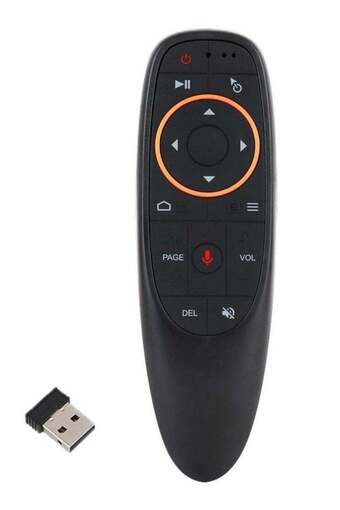
Generic 2.4G RF Wireless Air Mouse Remote with 6-Axis Gyroscope, IR Learning & Voice Input for Android TV Box/PC/Smart TV features
Instructions for Use/Warnings
IR Learning: 1. Keep pressing ‘power’ button. The air mouse enters IR learning mode when the LED flashes slowly. 2. Press the ‘power’ button when you aim the IR transmitter with air mouse. Air mouse receives the code successfully if LED light. 3. LED flashes slowly means that Air mouse has finished learning. 4. Data will be saved automatically and the product will exit learning mode. 5. Press ‘OK’+ ‘DEL’ to clean the code up. Voice Input: 1. Please install the Google Assistant app. 2. Click ‘micro’ button, then the voice function will open automatically. 3. Press and hold ‘micro’ to turn on voice channel. Release the key to turn off voice channel.
Importer info
information not provided
Responsible Person's Name
information not provided
Responsible Person's E-Mail Address
information not provided
Safety information
Product safety information