


Free shipping
Delivery address
Free shipping
Local delivery
Estimated delivery: 22 - 24 October
Select your address, find out the delivery date!
Trendyol's commitments
Easy and free return in 15 days.
Payment methods


Highlighted features:
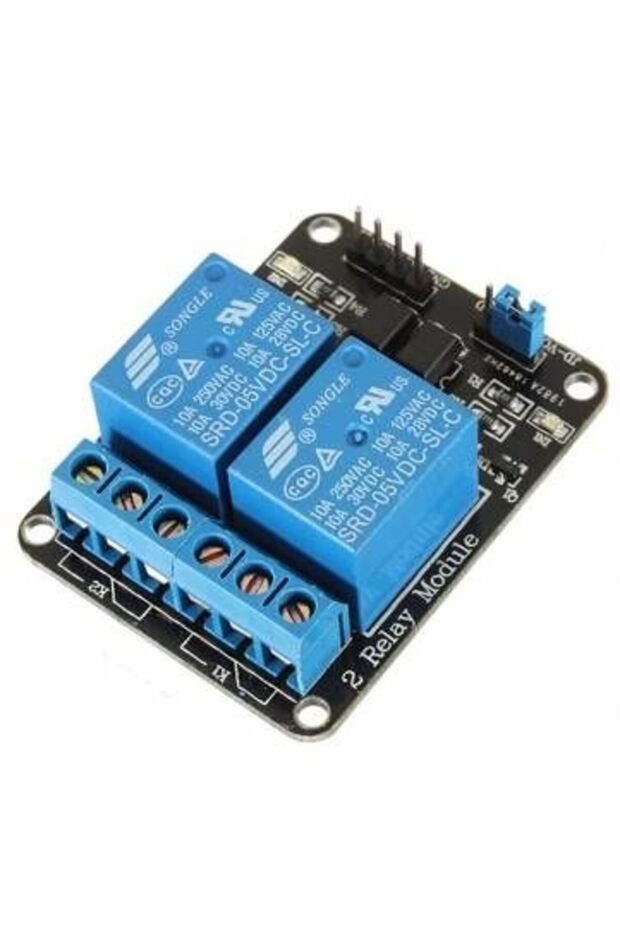
Generic 1C10 5V Two 2 Channel Relay Module With optocoupler features
Other Features
Optocoupler, LED status indicator, Screw terminals, Digital output controllable, TTL level control signal, Power supply isolation option
Instructions for Use/Warnings
Warning: This board interacts with HIGH AC voltage. Improper or incorrect use could result in serious injury or death. Therefore, it is intended for people who are familiar with and knowledgeable about HIGH AC voltage. Instructions for wiring: Connect module's VCC pin to the Arduino's 5V pin and the GND pin to ground. Connect a digital pin (e.g., #6) to an IN input pin (e.g., IN1). To control an AC-powered device, cut the live AC line; connect one end of the cut wire (coming from the wall) to COM and the other to NC (normally closed/on) or NO (normally open/off) depending on the desired initial state. For physical isolation, remove the jumper and provide a separate 5V power supply to JD-VCC and GND.
Blue PCB Electronics
7.8
Seller information
Shoppers also viewed


 Collage Series 13 - the Islamic Notebook That Will Make God Pleased with You (with Verses and Hadiths)















Generic 1C10 5V Two 2 Channel Relay Module With optocoupler reviews
No reviews yet.
Product details

Additional info
- Sold by .
- A maximum of 5 units of this product can be ordered. Trendyol reserves the right to cancel orders over 5 units.
- Barcode No: 2900000009028
Generic 1C10 5V Two 2 Channel Relay Module With optocoupler features
Other Features
Optocoupler, LED status indicator, Screw terminals, Digital output controllable, TTL level control signal, Power supply isolation option
Instructions for Use/Warnings
Warning: This board interacts with HIGH AC voltage. Improper or incorrect use could result in serious injury or death. Therefore, it is intended for people who are familiar with and knowledgeable about HIGH AC voltage. Instructions for wiring: Connect module's VCC pin to the Arduino's 5V pin and the GND pin to ground. Connect a digital pin (e.g., #6) to an IN input pin (e.g., IN1). To control an AC-powered device, cut the live AC line; connect one end of the cut wire (coming from the wall) to COM and the other to NC (normally closed/on) or NO (normally open/off) depending on the desired initial state. For physical isolation, remove the jumper and provide a separate 5V power supply to JD-VCC and GND.
Safety information
Product safety information