


Free shipping

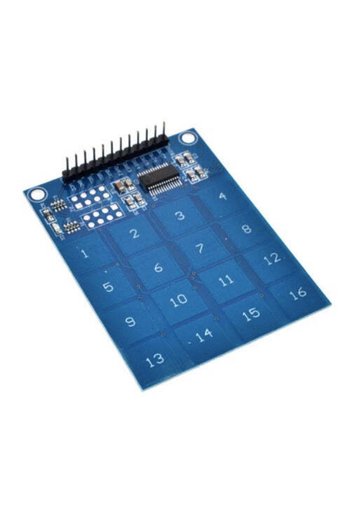
Generic 1B13 TTP229 16-Channel Digital Capacitive Switch Touch Sensor Module
No reviews yet.
33
AED
(incl. VAT)
Delivery address
Free shipping
Local delivery
Estimated delivery: 20 - 22 October
Select your address, find out the delivery date!
Trendyol's commitments
Easy and free return in 15 days.
Payment methods


Highlighted features:
Generic 1B13 TTP229 16-Channel Digital Capacitive Switch Touch Sensor Module features
Other Features
Capacitive Touch, Multi-mode (8-key/16-key), Low Pin Count Interface
Instructions for Use/Warnings
Instructions for Use: 1. Power the module with 2.4-5.5V (VCC and GND pins). 2. For 8-key mode: Ensure TP2 pins are open-circuit. Connect Out1-Out8 to microcontroller digital pins. Each key press makes its corresponding output pin HIGH. 3. For 16-key mode: Ensure TP2 pins are short-circuit. Use SCL (Serial Clock) and SDO (Serial Data Out) pins for communication. Only one key can be touched at a time in this mode. 4. Interfacing with Arduino: Follow the provided circuit diagram for connections. Use the specific code examples provided for 8-key or 16-key mode, ensuring the TP2 pin configuration matches the chosen mode.
Blue PCB Electronics
7.8
Seller information
Generic 1B13 TTP229 16-Channel Digital Capacitive Switch Touch Sensor Module reviews
No reviews yet.
Product details
Product description
Description Keypads are one of the most popular components that are widely used in electronics.
Everybody can communicate with different systems through switches.
Normally, every key occupies one digital pin of the microcontroller.
But by using a 4×4 keypad, you can reduce the number of occupied pins.
With this module, you can use all 16 switches by occupying only 2 pins of the microcontroller.
Documentation: TTP229 datasheet This 16-key capacitive touch keypad is based on the TTP229 IC.
Output pins 1 to 8 are for direct switching on and off keys 1 to 8. There are also 2 serial pins to use the 16-key mode.
How it works The 4×4 Keypad features a total of 16 buttons in matrix form.
This module can be adjusted in different modes.
The most important ones are as follows: Two TP2 pins are open-circuit.
In this mode, only 8 output pins are active to use 8 touch keys.
By touching each key, its relevant pin becomes HIGH, and by releasing it, it becomes LOW again.
Two TP2 pins are short-circuiting
in this mode, two serial pins are active to use all 16 touch keys.
You can only touch one key at a time.
TTP229 Capacitive Touch Keypad Pinout This module has 12 pins: VCC: Module power supply: 2.4-5.5V GND: Ground SCL: Input pin for Serial Clock SD0: Output pin for Serial Clock Out1: Digital Output pin 1 Out2: Digital Output pin 2 Out3: Digital Output pin 3 Out4: Digital Output pin 4 Out5: Digital Output pin 5 Out6: Digital Output pin 6 Out7: Digital Output pin 7 Out8: Digital Output pin 8 You can see the pinout of this module here.
Required Materials Hardware Components Arduino UNO R3 × 1 4x4 TTP229 Capacitive Touch Keypad × 1 Male to Female Jumper wire × 1 Software Apps Arduino IDE Interfacing 4x4 TTP229 Capacitive Touch Keypad with Arduino Step 1: Circuit The following circuit shows how you should connect Arduino to TTP229 module.
Connect wires accordingly.
Step 2: Code for 8 Key Mode Upload the following code to Arduino.
Note that for this mode, two TP2 pins must be open-circuit.
void setup(){ for(int x=2
x<
10
x++) pinMode(x,INPUT)
Serial.
begin(9600)
} void loop(){ for(int y=2
y<
10
y++){ if (digitalRead(y)==HIGH) Serial.
println(y-1)
} } In this code, we have connected 8 Arduino pins (2 to 9) to the 8 buttons of the module, and by touching each key, its number will appear in the Serial Monitor.
Step 3: Code for 16 Key Mode Upload the following code to Arduino.
Note that for this mode, two TP2 pins must be short-circuit.
/* Define the digital pins used for the clock and data */ #define SCL_PIN 10 #define SDO_PIN 11 /* Used to store the key state */ byte Key
void setup() { /* Initialise the serial interface */ Serial.
begin(9600)
/* Configure the clock and data pins */ pinMode(SCL_PIN, OUTPUT)
pinMode(SDO_PIN, INPUT)
} * Main program */ void loop() { /* Read the current state of the keypad */ Key = Read_Keypad()
/* If a key has been pressed output it to the serial port */ if (Key) Serial.
println(Key)
/* Wait a little before reading again so not to flood the serial port*/ delay(100)
} /* Read the state of the keypad */ byte Read_Keypad(void) { byte Count
byte Key_State = 0
/* Pulse the clock pin 16 times (one for each key of the keypad) and read the state of the data pin on each pulse */ for(Count = 1
Count <
= 16
Count++) { digitalWrite(SCL_PIN, LOW)
/* If the data pin is low (active low mode) then store the current key number */ if (!digitalRead(SDO_PIN)) Key_State = Count
digitalWrite(SCL_PIN, HIGH)
} return Key_State
} In this code, we receive data and send clock through two digital pins, one as input and the other as output.
Finally, by touching each key, its relevant number will appear in the Serial Monitor.
The output is as follows.
As you can see, different keys are accidentally touched.
Additional info
- Sold by .
- A maximum of 5 units of this product can be ordered. Trendyol reserves the right to cancel orders over 5 units.
- Barcode No: 2900000005488
Generic 1B13 TTP229 16-Channel Digital Capacitive Switch Touch Sensor Module features
Other Features
Capacitive Touch, Multi-mode (8-key/16-key), Low Pin Count Interface
Instructions for Use/Warnings
Instructions for Use: 1. Power the module with 2.4-5.5V (VCC and GND pins). 2. For 8-key mode: Ensure TP2 pins are open-circuit. Connect Out1-Out8 to microcontroller digital pins. Each key press makes its corresponding output pin HIGH. 3. For 16-key mode: Ensure TP2 pins are short-circuit. Use SCL (Serial Clock) and SDO (Serial Data Out) pins for communication. Only one key can be touched at a time in this mode. 4. Interfacing with Arduino: Follow the provided circuit diagram for connections. Use the specific code examples provided for 8-key or 16-key mode, ensuring the TP2 pin configuration matches the chosen mode.
Safety information
Product safety information