Free shipping

Only 1 left!
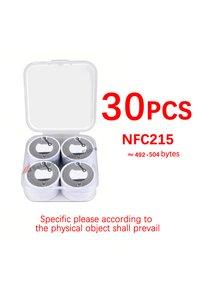
Choice 30pcs-NFC215 NFC 215 Self-Adhesive NFC Label Sticker 13.56MHz ISO14443A White Universal 215 Cell Pho
No reviews yet.
Checkout Discount 10% Off
At checkout
15.92 AED
17.69 AED
Free shipping
Delivery address

Select your address, find out the delivery date!
Trendyol's commitments
Easy and free return in 15 days.
Payment methods



Highlighted features:
choice2 30pcs-NFC215 NFC 215 Self-Adhesive NFC Label Sticker 13.56MHz ISO14443A White Universal 215 Cell Pho features
Other Features
*30pcs-NFC215

Big Save Store
8.8
80.6K followers
Seller information
Similar items













choice2 30pcs-NFC215 NFC 215 Self-Adhesive NFC Label Sticker 13.56MHz ISO14443A White Universal 215 Cell Pho reviews
No reviews yet.
Product details

Additional info
- A maximum of 10 units of this product can be ordered. Trendyol reserves the right to cancel orders over 10 units.
- Barcode No: 3589261729829
choice2 30pcs-NFC215 NFC 215 Self-Adhesive NFC Label Sticker 13.56MHz ISO14443A White Universal 215 Cell Pho features
Other Features
*30pcs-NFC215
Safety information
Product safety information
Product description
Color:30pcs-NFC215
Chip: NFC215
Usable capacity:215 approx. 492-504 bytes
Reading distance: 1 to 5 centimeters
Read/write time: 1 to 2 milliseconds
Operating temperature: -20 to 55 degrees Celsius, 90 degrees humidity
Erase count: >100,000 times
Data storage > 10 years
Read time: 100,000 times
Diameter: 25 mm
Packaging: Self-adhesive PE + coated paper
Tutorial
1: Prepare a cell phone that supports NFC function.
2:Download the NFC reading and writing software on your cell phone (the cell phone comes with an application store or search online to upload)
3: According to your actual situation, choose the project software, such as: text recording, URL recording, Bluetooth recording, etc. ....
4: If you want to write the URL format, simplify the URL to the smallest byte, click the URL and paste it to your cell phone. If you want to write the path is bluetooth or wifi, configure it according to the software instructions, and for other related purposes, just follow the software instructions.
5: After the software configuration is completed, remove an NFC sticker and ring it according to the software prompts and the phone's NFC reading position.
6: Wait for the software instructions (leverage writing success)
7:After successful writing, gently touch the NFC sticker with the NFC position of the cell phone, if the cell phone prompts (NFC detected whether to open) and other words, click to open and check whether the content is consistent with the contents of the write.
8、Successfully configure the NFC sticker, paste it to the position you want to paste.
9: reset problem: reset NFC sticker, you also need to use NFC reading and writing software, specific software, please operate according to the software instructions, each NFC sticker can be erased more than 100,000 times!