


Free shipping
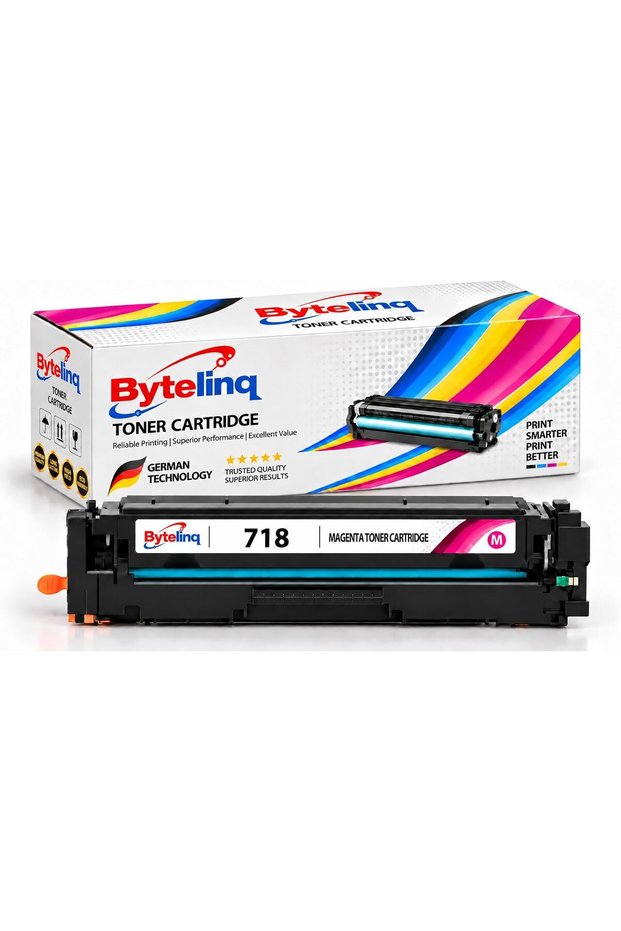


Bytelinq 718 Toner Cartridge Magenta Compatible with Canon i-SENSYS LBP7210Cd, LBP7660cd, MF720, MF724Cd, MF726, MF728, MF8340, MF8360, MF8380, MF8540 and MF8580 (Magenta)
No reviews yet.
59.99
AED
(incl. VAT)
Free shipping
Delivery address

Local delivery
Estimated delivery: 28 - 30 November
Select your address, find out the delivery date!
Trendyol's commitments
Easy and free return in 15 days.
Payment methods



Highlighted features:
Available campaigns

Applied at checkout
Goodcore Computers LLC
Seller information
Bytelinq 718 Toner Cartridge Magenta Compatible with Canon i-SENSYS LBP7210Cd, LBP7660cd, MF720, MF724Cd, MF726, MF728, MF8340, MF8360, MF8380, MF8540 and MF8580 (Magenta) reviews
No reviews yet.
Product details
Product description
Wide Compatibility – Compatible with Canon 718 toner cartridge models for dependable replacement and everyday printing.
Compatible Printer Series – Designed for Canon i-SENSYS LBP7200 cdn Canon i-SENSYS LBP7200 cn Canon i-SENSYS LBP7210 Cdn Canon i-SENSYS LBP7600 Series Canon i-SENSYS LBP7660 cdn Canon i-SENSYS LBP7680 cdn Canon i-SENSYS LBP7680 cx Canon i-SENSYS MF724 Cdw Canon i-SENSYS MF726 Cdw Canon i-SENSYS MF728 Cdw Canon i-SENSYS MF729 Cdw Canon i-SENSYS MF729 Cx Canon i-SENSYS MF8330 Canon i-SENSYS MF8330 cdn Canon i-SENSYS MF8340 cdn Canon i-SENSYS MF8350 Canon i-SENSYS MF8350 cdn Canon i-SENSYS MF8360 cdn Canon i-SENSYS MF8380 cdw Canon i-SENSYS MF8540 cdn Canon i-SENSYS MF8550 cd Canon i-SENSYS MF8550 cdn Canon i-SENSYS MF8580 cdw -model Reliable Page Yield – Black cartridge delivers approximately 3,400 pages, while Cyan, Magenta, and Yellow each provide approximately 2,900 pages at 5% page coverage.
Premium Components – Manufactured with German-engineered toner powder, a premium OPC drum, durable cartridge housing, and an upgraded smart chip for stable recognition and consistent print performance.
Easy Installation &
Technical Support – Simply remove the sealing tape, orange protective side seals, and yellow drum cover before installation.
Bytelinq technical support is available anytime to assist with installation, cartridge recognition, or troubleshooting.
Installation Instructions: Carefully unpack the toner cartridge.
Remove the sealing tape or pulling seal completely.
Remove the orange protective side seals from both the left and right sides, if present.
Remove the yellow protective drum cover, if present.
Handle the cartridge carefully and avoid touching the OPC drum surface.
Insert the cartridge gently into the correct printer slot.
Ensure the cartridge is properly seated before closing the printer cover.
Important: Remove all transportation seals and protective covers before installation.
Follow the printer manufacturer's installation instructions.
Quality and Performance: Crisp and clear text.
Vibrant and consistent color output.
Smooth graphics and professional-looking documents.
Designed to support reliable cartridge recognition.
Consistent print performance for everyday printing tasks.
Suitable for home, office, and business use.
Additional info
- A maximum of 5 units of this product can be ordered. Trendyol reserves the right to cancel orders over 5 units.
- Sold by .
- Barcode No: PMP1ZT8MAXAHU8GA42
Safety information
Product safety information